Wondering how to share a password from iPhone to iPhone or to an iPad or Mac? If you want to let someone else watch your Netflix account, or log in to a website to view your shopping list, sharing the password safely and accurately can be a real pain. Especially if you are using longer, more secure passwords. But you don't have to type and text the password or read it out loud to the person you're sharing it with. The easiest way to share a password securely is by using AirDrop. This tip will show you how to share a password iPhone to iPhone or to other Apple devices, without any mistakes. Let’s get going with how to use AirDrop for password sharing on the iPhone.
The saved passwords for your apps and websites are listed alphabetically.
Scroll through or use the Search bar and tap the name of the account you want to share.
Tap Password.
Select AirDrop.
Now, tap the contact or device you want to share your password with.
Your contact will receive a prompt, followed by the password you’re sharing. That’s all there is to it! In addition to passwords, you can also share photos using AirDrop. AirDrop is a fast, accurate, and secure way to share items from your iPhone with your family and friends.
You probably already know that you can react to text messages with a heart or a thumbs up. But Memoji stickers are another fun way to react to text messages and give your conversation a personal touch. You can add stickers to an iMessage, even after that message was sent! If you already have a Memoji sticker sheet, then you probably want to know how to add those stickers in a message. This tip will show you how to add a Memoji sticker after the message is already sent, for the ultimate in text customization. Read on to learn how to use your Memoji stickers for text messages.
If you see your app menu on the bottom of the screen, tap the gray App Store icon.
Select the Sticker sheet icon.
Select the Sticker sheet you want to use.
Now, drag and drop the Memoji sticker you want to add to the conversation.
You can drop it anywhere you want on the screen, and the person you’re talking to will see it as well!
That’s all there is to it! Now you can use Memoji stickers to react to your conversations. This works for all the stickers, not just Memoji, so you could react with a cow, an octopus, or any of the other fun options.
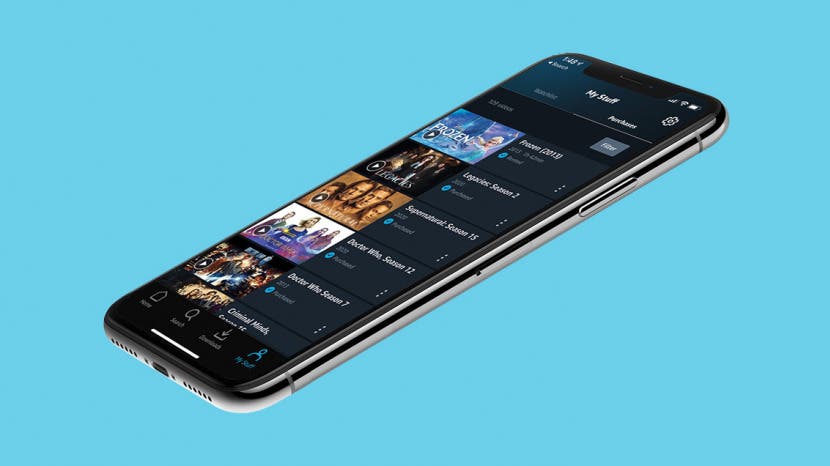
Want to learn how to rent a movie on Amazon Prime to watch on your iPad or Apple TV? Movies and shows can be an exciting way to pass the time, but Amazon sure doesn’t make rentals easy on the iPhone, iPad, or Apple TV. With so many different Amazon apps, why is buying and renting movies and TV shows so hard to figure out? Don’t worry; we’ve got you covered to make your next family movie night a success.
Simple Mobile Prepaid - Apple iPhone 11 Pro (64GB)
Simple Mobile Prepaid - Apple iPhone 11 Pro (64GB)
View it ON Website $948.15
It’s worth noting that for TV shows and most new release movies, you’ll only have the option to buy. If the movie you’re dying to watch isn’t available to rent yet, check back in after a few days; chances are good it will be added soon!
Four years ago, Apple released the iPhone SE; and now, in a virtual unveiling, Apple is introducing the second generation of this simple, streamlined phone. While the SE uses older technology such as a Home button with fingerprint authentication and a single-lens camera, this compact new iPhone also offers many features of a higher-priced model, including the A13 Bionic Chip, high-end iPhone photography and video features, water and dust resistance, wireless charging, and tons of battery life. And you get all of that for $399, a price lower than we've seen for years (the regular iPhone now starts at $699). Let's get into the release date, cost, and features of the latest iPhone, so you can decide if you're going to upgrade or stick with your current phone for another year.
The new second-generation iPhone SE, announced on April 15, is currently available for pre-order and will be in stores on Friday, April 24.
New iPhone Price
Apple is continuing its trade-in program, where you can turn in your gently used iPhone to lower the cost of your new iPhone. Check with Apple to see if your model of iPhone is accepted, and how much credit you'll receive. If you aren't trading in your old phone, you'll pay full price for your 2020 iPhone; see prices below.
You can Buy your iPhone SE 2020 with following Prcie and instalment Schedule.
$399 or $16.62/month for 64 GB
$449 or $18.70/month for 128 GB
$549 or $22.87/month for 256 GB
iPhone SE (Second Generation) Features
Comes in black, white, and Product(Red) finishes
Home button with Touch ID
4.7-inch Retina Display with Tru Tone
1334-by-750 pixel resolution at 326 ppi
64, 128, or 256 GB
A13 Bionic chip with third-generation Neural Engine
Wireless and USB charging with Fast Charge capability
Single camera with 12-megapixel and f/1.8 aperture Wide camera
4K video recording at 24 fps, 30 fps, or 60 fps
1080p HD video recording at 30 fps or 60 fps
720p HD video recording at 30 fps
Extended dynamic range for video up to 30 fps
Optical image stabilization for video
Digital zoom up to 3x
Up to 13-hour battery life for video playback, up to 8 hours for streamed video playback
IP67 Water and Dust Resistance for up to one meters for as long as thirty minutes
2020 iPhone Features: Why Buy the New iPhone?
Now for the new iPhone features. What makes 2020's iPhone worth buying? This year marks Apple's most affordable iPhone ever, and the company has packed a lot of features into this lower-end phone.
New iPhone Screen Size
One aspect of Apple's new iPhone will be considered a gain for some and a loss for others; the small screen size. At just 4.7 inches, the second-generation SE is considerably smaller than last year's iPhones. For those who've been missing the compact iPhone, this is just what they've been hoping for.
A13 Bionic Chip
Now, for processing power. Apple introduced the A13 Bionic Chip with the iPhone 11, its most powerful chip to date. The inclusion of the A13 means that second-gen SE owners will enjoy app launch, augmented reality experience, and gameplay just as smooth as on the iPhone 11, while saving a cool $300.
New iPhone Camera & Video Features
The new iPhone SE is a great choice for those of us who don't want to sacrifice iPhone photography features, but also don't want to break the bank. While the SE comes with a single lens, it works with the A13 chip to offer Portrait mode, even for selfies, as well as Depth Control, Portrait Lighting options, and next-generation Smart HDR, which brings out the best in both human subjects and background details.
4K video capability with extended Dynamic Range means that you'll catch incredibly detailed footage, even in highlights and shadows. Audio is captured with stereo recording, just like the iPhone 11! QuickTake adds convenience to your photo shoots; just hold the shutter button to switch from Photo to Video!
The Home Button Is Back!
For better and for worse, the Home button is back. For those of you who've been missing the old, familiar Home button, you're going to love this! Apple has reintroduced the Home button with Touch ID in the new iPhone SE.
iPhone SE (Second Generation) Battery Life & Charging (Wireless & Fast Charging)
Once again, the latest iPhone doesn't disappoint; battery life approaches that of Apple's most expensive iPhone models. You'll be able to watch up to thirteen hours of video playback or eight hours of streaming video on a single charge (as compared to seventeen hours playback and ten hours streaming on the iPhone 11). When it's time to charge, you have two options, wireless or fast charge. If you choose the Fast Charge option using an 18W cable, your iPhone's battery can charge up to fifty percent in only a half hour.
Are You Buying the New iPhone?
The latest iPhone comes at a great price with lots of high-end features, but lacks some amenities Apple enthusiasts have grown accustomed to. Those who want a large screen won't be pleased by the second-gen SE, and those who've gotten used to swipes and gestures instead of the Home button may not want to go back. iPhone photography enthusiasts will miss the Night Mode feature, too. As well, the new iPhone doesn't offer 5G connectivity, which some consumers have been holding out for.
So, what do you think? Is this new iPhone the one for you, or will you wait for the iPhone 12 to make its debut?
Need to do a group FaceTime call instead of a group text? Texting is great, but sometimes, you need to have a conversation face-to-face. Starting a group FaceTime from a group text message is the easiest way to start a group call. The contacts involved will be notified and can join the ongoing FaceTime chat whenever they're ready. It's quick and easy to do a group FaceTime call from a group text, so let's dive in.
The contacts you're calling will receive a notification. They can then join the call.
While you're waiting for your friends to connect, your screen will look like this.
When you're finished with the conversation, tap the bottom of the screen to bring up the menu.
Select End.
The best part is that FaceTime isn't just for local calls; international FaceTime calls are also free! You just need a Wi-Fi or cellular connection to make it work. It's so nice to be able to take face-to-face, no matter where you are.