
The ‘emoji’ originated in 1997 as a simple pictogram used to express emotion. But after years of evolution, the technology has progressed to the point that the Galaxy S10 AR (augmented reality) Emoji can transform your face into an animated version of itself before your eyes. Once you have your avatar, your AR Emoji can mirror a wide range of emotions and body movements with advanced facial and body tracking. You can even impose your AR Emoji on top of a photo of yourself and watch it move just like you!
Samsung Newsroom met with the developers of the Galaxy S10 AR Emoji, Yong-Il Kim, HanJun Ryu, MinKyung Lee, Jinho Lim, and MinSheok Choi, to discuss how they are leading the future of AR Emoji, and what’s next for the technology.
Q. What is the current trajectory of AR Emoji development?

The AR Emoji feature is a way to express and represent yourself. As we switched over from the Galaxy S9 to the Galaxy S10, we changed our focus from the representative ‘Avatar’ to the ‘Stylized Avatar’, which portrays users’ individual traits so attractively that they can’t help but show it off! To achieve this, we have created avatars that users feel affectionate toward because they represent their individual traits, but which also maintain a universal aesthetic appeal.

People use AR Emoji to reproduce themselves in the online sphere. Therefore, the feature must be able to portray not only their physical appearance, but also their online personality. We are continually coming up with ways for users to more freely and uniquely personalize their AR Emojis.

Q. What makes AR Emoji special?

The AR Emoji feature’s biggest differentiator is that it starts off by making a complete, detailed figure that best reflects the user’s actual traits. AR Emoji has avatar shapes to suit everyone and features a huge number of ways for users to represent their unique characteristics.

The features available in AR Emoji on the Galaxy S10 line include ‘Mask’ mode, ‘Mini motion’ and ‘Live figure’, all of which can be used in a range of situations. Because the AR Emoji feature is a specialized camera function, it can be used within the default camera app. It has proven to be a popular feature among users.
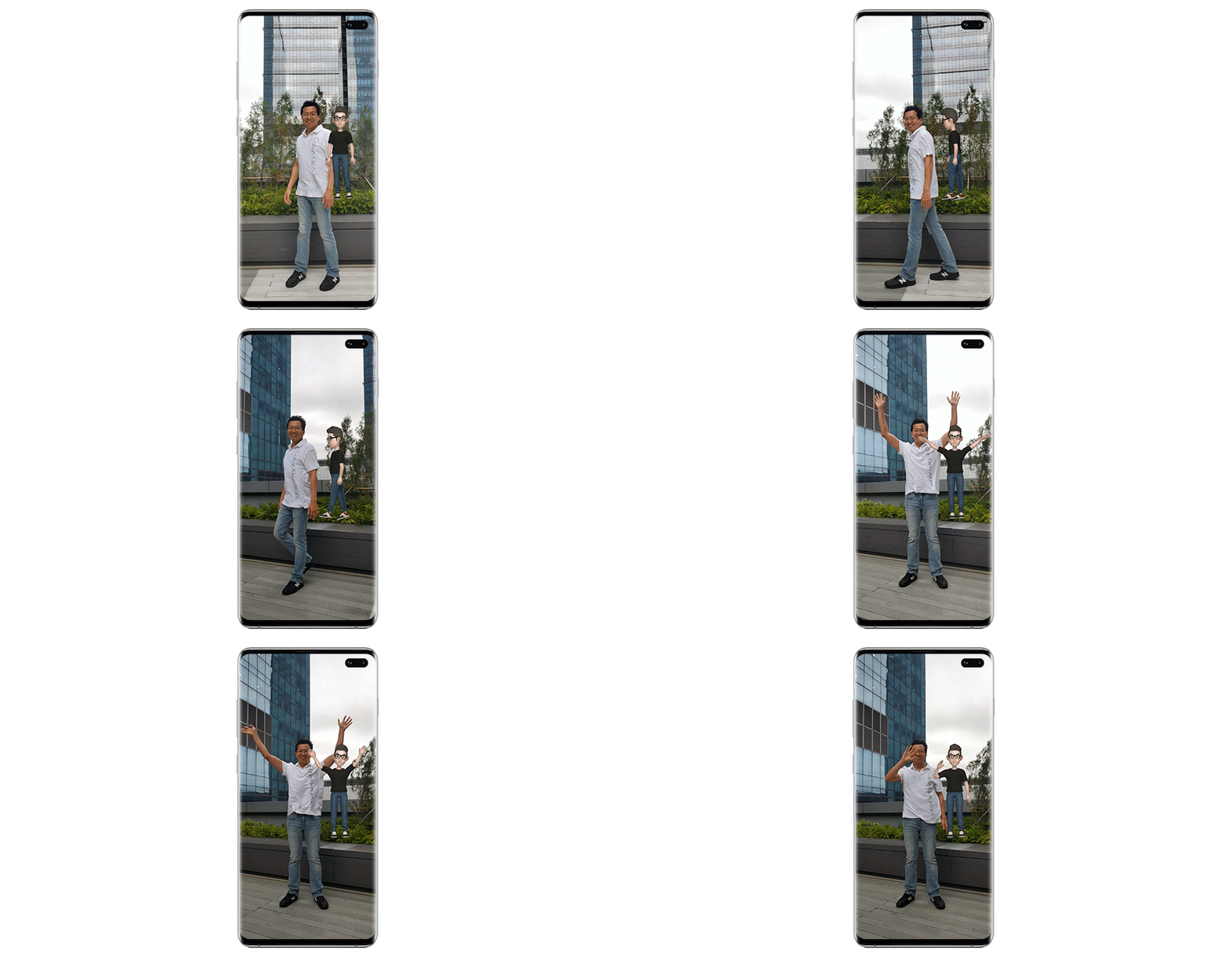
With ‘Mini motion’, body movements are captured so that the AR Emoji moves just like the user.
Q. What was your process for developing AR Emoji?

During planning it is important to identify the users’ needs. To figure out what these were, we monitored our acquaintances, families and a range of online communities to make sure that we made an AR Emoji that everyone would be satisfied with.
In the design stage, we considered how we could best express users’ emotions through facial expressions and stickers. The most common human emotions were categorized, then we had to establish the various degrees of each emotion. For example, there are many different kinds of sadness. Some make you want to scream, some make you want burst into tears, and some only cause a downturn of the mouth. When we struggled to find specific references for certain emotions, our team stepped in as actors to record their emotions. During this process, having emotive team members was a big help! Our recording sessions were always full of laughter.
Also, as an AR Emoji is a full body avatar, we needed to include a wide range of fashionable clothing items, shoes and accessories to make sure users had enough options to choose from. Research was very important at this stage, and some of our team members scoured shopping malls to ensure that we chose the right clothing options.
The version of AR Emoji that’s available on the Galaxy S10 line has updated editing tools. In developing these, we had to make internal decisions about how we were going to structuralize and define every component of the 3D data. For instance, we had to make decisions like ‘let’s divide the bone structure of the arm into five parts, and cover two of them with the sleeve while the rest are just bare arm.’ This was a useful process though, because as we were defining the details, a number of other potential features occurred to us. For example, we added the shadows on the avatar’s backs during this stage.

For more customization and creativity, users can utilize their own AR Emoji to create stickers.
Q. Do you have any tips for how best to use the AR Emoji feature?
You can use your avatar to make stickers that can be sent via messenger. This feature allows you to send customized emoji stickers with any expression you like. You can also create memes or stickers that include text to give the image more context.
A mask mode that applies your avatar’s face over your own is another useful function. When you need to take a photo but you haven’t had time to get yourself camera-ready, you can cover your face with an emoji. AR Emojis can also be very helpful for the many online creators who like to dress up or disguise themselves while recording their videos.
‘Mini motion’ is a function that both adults and children can enjoy. If you enjoy dancing, it can be fun to have a virtual figure to dance along with, instead of dancing alone.

Users can have more fun with the ‘Mask mode’, which adds the AR Emoji’s face onto users’ faces.
Q. Can you tell us what’s currently being worked on with regards to AR Emoji?
We are thinking about how AR Emojis can be used in new ways, such as users being able to play as their avatars in games. We are also working on incorporating popular characters into AR Emoji, as well as allowing users to custom-add things like make-up and tattoos so they can better express themselves with their emojis.

The global trends are centered around incorporating more and more decorative tools. However, we have also tried to be focus on being inclusive, with features like artificial hands currently available, and artificial legs to become available soon. By continuing to add more customization tools to AR Emoji, we hope to help people better express themselves. But we also want to see AR Emojis become a place where users’ imaginations can be brought to life.

We’re looking for ways to allow users to represent not just their faces, but their bodies too. Another area of focus is finding a way to utilize AR Emojis on other Samsung apps. Users can currently set their phones to display contacts’ emojis when they call, but we are exploring other uses that include a mask mode for video calls too.

As developers, our priority is to improve usability. Currently, in ‘Live figure’ mode, users can tap the figure on the screen to trigger a range of gestures and dances. We want to make these motions more fluid, while also expanding the feature by incorporating further actions and promoting deeper interaction between users and their emojis.
Q. What does the future hold for AR Emoji?
I hope AR Emoji will offer users a chance to familiarize themselves with AR technology and become more comfortable using it. As virtual reality-based services are commercialized and become more common, we expect AR emojis to be the best method for people to represent themselves in the virtual sphere.
Ultimately, our goal is to make AR Emoji a personified visual assistant in the coming age of AI (Artificial Intelligence). For example, currently Bixby can give us updates on the weather, but I believe that information could be delivered more effectively by an AR Emoji holding an umbrella.

(Clockwise from the top left) Samsung developers Yong-Il Kim and HanJun Ryu from Unique Sales Point Strategy Group, MinKyung Lee from Media UX Group, Jinho Lim from Graphic R&D Group and Minsheok Choi from Visual S/W R&D Group
* This article was originally published here


