Showing posts with label Galaxy. Show all posts

Friday, August 16, 2019

Galaxy Note10+ Receives DisplayMate’s Highest-Ever A+ Grade

Galaxy Note10

The results of DisplayMate’s comprehensive tests are in, and the world’s leading evaluator of video screens has concluded that the Galaxy Note10+ establishes a bold new standard for mobile displays – one that’s deserving of the firm’s highest-ever Excellent A+ grade.

As DisplayMate’s President, Dr. Raymond M. Soneira, explained, “The level of display performance and excellence has been increasing each year, and the Galaxy Note10+ has again raised the bar significantly higher.”

According to Soneira, the Galaxy Note10+ possesses “the most innovative and high-performance smartphone display that [DisplayMate has] ever lab tested.” During the evaluation, Samsung’s latest flagship outperformed its predecessor in several key categories, including brightness, reflectance ratio, color accuracy and blue light reduction.

Both the 6.3-inch, Full HD+ (2280×1080) Galaxy Note10 and the 6.8-inch, Quad HD+ (3040×1440) Galaxy Note10+ boast Samsung’s all-new Dynamic AMOLED Infinity-O Display. The smartphones’ immersive screens include a single small, centered camera cutout at the top that allows them to offer users an exceptionally high screen-to-window ratio.

The Galaxy Note10+’s peak brightness score of 1,308 nits is an improvement of 25 percent over the Galaxy Note9 (1,050 nits), while its screen reflectance ratio is the lowest that DisplayMate has ever measured on a smartphone (4.3 percent). The smartphones’ combination of high screen brightness and low screen reflectance allows them to offer better screen readability, picture quality and color accuracy in bright environments, such as when users are outdoors.

The Galaxy Note10+’s 0.4 Just Noticeable Color Difference (JNCD) is an improvement on the Galaxy Note9’s 0.5 JNCD score, and a testament to the device’s color accuracy. Put simply, the closer a display’s JNCD score is to zero, the more accurate its colors are. The Galaxy Note10+’s 0.4 JNCD score indicates that colors depicted on its display are virtually indistinguishable from perfect.

HDR10+ support enables the Galaxy Note10+ to depict high-resolution content, such as 4K UHD videos, as realistically as possible, while Dynamic Tone Mapping technology optimizes colors from scene to scene, ensuring that content is presented exactly as creators intended. During its tests, DisplayMate also found that the Galaxy Note10+ reduced up to 37.5 percent more blue light than the Galaxy Note9 – without compromising color accuracy.

Based on its outstanding performance throughout rigorous testing, it’s easy to see why DisplayMate described the Galaxy Note10+’s screen as “an excellent, top-tier, world-class smartphone display” and described Samsung as a company that “continues to systematically improve OLED displays.”

The Galaxy Note10 and Galaxy Note10+ will officially launch starting from August 23. To learn more about the smartphones’ immersive displays and other exciting features, be sure to check out our in-depth look at the devices, here.


* This article was originally published here

Wednesday, August 7, 2019

How to Watch Samsung Galaxy Unpacked 2019


The countdown’s on! Samsung Galaxy Unpacked 2019 is just a day away, which means the newest additions to the Galaxy family are ready to make their big debut.

If you won’t be able to make it to New York City for tomorrow’s event, don’t fret! You can still watch the action unfold live on August 7 at 4 p.m. EDT via any of the links below.


To Tune in via Samsung’s Official Websites:

Visit Samsung Newsroom, Samsung Mobile Press, or Samsung.com when the event begins.


To Tune in on Facebook:

Visit Samsung Newsroom or Samsung Global’s Facebook page when the event begins.


To Tune in on Twitter:

Visit Galaxy Unpacked’s Twitter page when the event begins.

Enjoy the show, and don’t forget to check out Samsung Newsroom’s Galaxy page for all the latest updates on Samsung’s newest innovations!


* This article was originally published here

Saturday, August 3, 2019

[Hands On] The Perfect Companion for Active Life, 24 Hours with the Galaxy Watch Active


Summertime has come. A lot of people are interested in exercise, fitness, and maintaining a healthy lifestyle during this time of the season. Samsung Newsroom has decided to spend 24 hours with the Galaxy Watch Active to see if it is the perfect companion that will help me get the summer body.


Once I wore the watch, I immediately noticed the look and feel of the slim fit. Given its various activity-tracking features that include sleep tracking and stress detection, consumers could easily assume that the watch would appear to be bulkier in person. But the small and light 28mm display weighs only 25g that consumers with thin wrists and women can wear it with ease. Also, the watch straps are sturdy and smooth that does not collect dust. The Galaxy Watch Active is designed to keep the remaining strap tucked against your wrist, making it extremely convenient to use.


7:30 AM – Starting the Day with Sleep Tracking Data


The first thing I did when I woke up was to check the sleep tracking data. Using the Samsung Health app, the Galaxy Watch Active provides a rundown of the stages of sleep1 through the night and sends personalized analysis related to my sleeping habits. Thanks to the sleep data, I realized that my sleeping habits were irregular. To build a healthier habit, I decided that I should try to go to bed at a certain time regularly to enhance my quality of sleep. And with the recent Software Update, it was easier for me to switch to ‘Goodnight Mode’ before I went to sleep. When it is time for me to go to bed based on my sleeping pattern, the device lets me know if I want to set the mode on. Once it is activated, it turns the sound and screen off so that I will not get distracted while I am asleep.


8:30 AM – Checking my Schedule Without Turning on the Phone

“Hi Bixby, show me today’s schedule.” When I was on my way to work, I asked Bixby to check my schedule for the day and the weather without taking the phone out of my bag. All of this is possible since my phone is synced with the Galaxy Watch Active. This was the most useful function especially when I was holding my bag or other larger personal belongings. Just by using the voice command, I was able to check my schedule, the weather, start recording my workout when I am exercising, and even control my home devices through SmartThings (an IoT app).


2:30 PM – How I can Charge My Watch Without a Battery Charger


During the afternoon, the Galaxy Active Watch sent a notification that the battery was running low. Though I can charge the watch with a battery charger, I don’t have to carry it with me all the time since I can simply use Wireless PowerShare on the Galaxy S10 to recharge. With Samsung’s device ecosystem that is seamlessly connected, it is very helpful.


4:00 PM – The Watch Vibrates When a Message Arrives


While I was concentrating on my work at the office, I felt a weak vibration on my wrist. I checked the watch and saw a text message from my friend asking me if I wanted to get some pizza this weekend. The great thing about the Galaxy Watch Active is that I don’t have to use my phone and unlock it to reply to a text since I can simply respond back using the watch. I can use my finger to draw an emoticon or use the keyboard and voice input to respond to long messages. Using these features, I texted back, “Love to ♥.”


6:10 PM – Heading Home from Work, Taking the Stairs and Achieving my Workout Goals


A healthy habit starts with a single step. “Daily Activity” feature reminds me to move hourly, burn more calories and workout every day. When I am concentrating on my work at the office, I would not leave the desk for hours. However, when I receive notifications from the Galaxy Watch Active, I never forget to do some stretches every hour since the device detects my movement patterns. And though I usually tend to use the escalators when I am using the subway, I chose to take the stairs instead to reach my daily goals. The best feeling is when I get a notification telling me that I reached my daily goal.


8:00 PM – Exercising at Home Without the Help of a Personal Trainer


After a hard day at work, I still managed some time to exercise at home so that I can get that summer body. With the Galaxy Watch Active, the device can automatically detect and track seven types of exercise such as walking, running, riding a bike and swimming when I am working out for a certain amount of time. Not only that, I can check how much time I spent and how many calories I have burned by selecting an exercise routine from thirty-nine types of exercise from lunges to squats, yoga, etc. When I wanted to give up because it was getting too hard to exercise, I kept on going when I saw how close I was to meeting my goals from the watch. I was motivated to reach the targets and finished my daily workout. I have never felt so much accomplishment.

My 24 hours with the Galaxy Watch Active helped me to maintain healthier habits and increase activities. I could have easily given up if I were to go through the process all by myself. They say that pros do not make excuses on tools/devices, but it is also true that we rely on good tools to enhance our efficiency, including for workouts. The Galaxy Watch Active is the perfect partner for people who seek to live healthier lifestyles. Comfortable and easy-to-wear designs with useful apps, features like alarm services, and the newly launched straps are added bonuses.

1 Four stages including △Awake (including the moments when the user is awake or toss and turn) △REM △Light △Deep


* This article was originally published here

Tuesday, July 30, 2019

[Hands On] The Galaxy A80 is Empowering Live Content

Ever at the forefront of hardware innovation, Samsung Electronics is empowering users wanting to create, collaborate and consume on the go with the newest smartphone in the Galaxy A series. After spending some time with the Galaxy A80, we found that the phone’s rotating camera array, full-screen New Infinity Display and ‘smart battery’ broke new ground as far as versatile, high-quality content interactions.

Samsung Newsroom got hands on to put the newest in the Galaxy A series to the test.

Samsung, Galaxy, A80, Live, Content


A Camera that Flips Around

Equipped with Samsung’s first rotating camera array, the Galaxy A80’s triple camera set-up features a 48MP main camera, an Ultra Wide Camera and a 3D Depth Camera. The camera array combines to produce a number of effects, some familiar and some new.

But the best part about the Galaxy A80 is that the range of camera effects aren’t just limited to the camera on the back of the phone. The A80 employs a slide-out panel on top of the phone that automatically extends upward and flips the camera around to face the user when they switch to the front-facing camera mode, allowing the powerful camera array to be used for selfie-mode photos too. The sliding module fitting seamlessly into the back of the phone when lowered, making the motor-driven raising and lowering of the camera array very sleek.

Samsung Galaxy A80
Taking a selfie with Wide mode on the Galaxy A80

The ability to use the phone’s 48MP main camera for front-facing photos struck us as a game changer. For shots where we wanted to take a selfie while still capturing a significant portion of the background, Wide mode on the selfie camera was ideal. To take the effect a step further, the Galaxy A80 is also equipped with Ultra Wide mode*, which has a viewing angle as wide as that of the human eye, and is perfect for taking wide scenery and nature shots. We had a lot of success using Ultra Wide mode to take front-facing photos too, as it worked well for taking selfies with large groups of people and taking pictures in front of things like large landmarks. What’s more, all of these images were captured in stunning Wide Quad HD quality due to the fact that we were able to use the 48MP main camera to take them.

Live focus mode was another favorite of ours. The feature uses the depth sensor and machine learning to apply a cinematic blurring effect on the background while keeping the subject in the foreground crisp and focused. The ‘bokeh’ blurring effect is adjustable, and leads to some artistic, professional looking shots.

We loved the content creation possibilities afforded by the Galaxy A80 too. When taking videos while walking or running, Super steady mode was a big help in reducing camera shake and smoothing out videos. We were even able to create some movie-like videos with bokeh backgrounds using Live focus video mode. The Galaxy A80 allows you to switch in and out of selfie mode in the middle of a recording too, with the phone seamlessly blending the footage on either side of the camera rotation so that you can switch back and forth between the front and rear-facing cameras without interrupting your video**. The newest in the Galaxy A line can even capture videos in stunningly crisp 4K Ultra-high definition mode (3840 X 2160 pixels).


A True Full-Screen Display

Samsung Galaxy A80

The Galaxy A80 features Samsung’s first full-screen display – a 6.7-inch FHD+ Super AMOLED New Infinity Display. Without a notch, waterdrop or cut-out, playing our favorite racing game was just how we’d always wanted it to be – big, bright and uninterrupted. While playing, we discovered that we were more likely to spot other players and in-game details on the bigger, unobstructed display, and that instances where we were hitting the wrong buttons by mistake were lessened because the controls were more spread out.

Samsung Galaxy A80

The Galaxy A80 features Samsung’s first full-screen display – a 6.7-inch FHD+ Super AMOLED New Infinity Display. Without a notch, waterdrop or cut-out, playing our favorite racing game was just how we’d always wanted it to be – big, bright and uninterrupted. While playing, we discovered that we were more likely to spot other players and in-game details on the bigger, unobstructed display, and that instances where we were hitting the wrong buttons by mistake were lessened because the controls were more spread out.


Intelligent Power and Performance

All the great features mentioned above are rendered useless without reliable battery life on the go. The Galaxy A80’s 3,700mAh smart battery and intelligent performance functions to be up to the task.

With its intelligent battery, the Galaxy A80 analyzes usage and automatically closes background apps that are unnecessarily using up battery life. To take battery conservation a step further, users can turn on Adaptive Power Saving, which allows their device to modify settings according to users’ expected daily usage. After giving the phone some time to get used to our usage patterns, we found that this feature really helped in preserving battery life. Once the battery does eventually tick down, the Galaxy A80 is equipped with Super Fast Charging**** technology to get users charged back up quickly.


The device is also equipped with an ‘Intelligent Performance Enhancer’, which allows the phone’s AI to optimize CPU and RAM usage and ensure that the amount of power being drawn is always a match for the user’s unique usage patterns. We additionally appreciated how the Intelligent Performance Enhancer would preload our most-used apps to ensure that they were able to be quick-launched when needed.


Cool Extras

In addition to getting lost in the Galaxy A80’s edge-to-edge New Infinity Display, now users can experience immersive sound too. The device is equipped with Dolby Atmos audio that allows for a 360-degree audio experience when using headphones or a Bluetooth speaker.

The Galaxy A80’s ergonomic curved back (available in Angel Gold, Ghost White and Phantom Black) makes it comfortable to grip in one hand. Likewise, the position of the power button lower down on the side of the phone, and easy-to-activate ‘One-handed mode’ made the phone easy to use when we had a lot going on.

Optimal for creating and consuming media, with a battery that can be counted on, the Galaxy A80 is the ideal companion for the content-hungry user living in the now.


* Viewing angle is adjusted for selfies taken with the Ultra Wide Camera
** Super steady mode must be turned off before camera will switch between front and rear-facing modes mid-video
*** Available after downloading certain third-party apps
**** Super Fast Charging is only available with a compatible 25W charger and cable


* This article was originally published here

Monday, July 29, 2019

[Samsung At Your Service] ① Samsung Service Introduces Visual Support Feature for More Effective Diagnosis and Troubleshooting

After purchasing a product, which company channel do customers then turn to the most throughout the lifespan of that product? The answer is a company’s customer service. Customers will contact a customer service when they have questions about or issues with the products that they have purchased. More than just a ‘repair’ center, ‘customer service’ is an organization with a range of operations and systems in place to provide customer satisfaction. The service customers receive from a company can hugely affect their perception of the company, and so Samsung Electronics, understanding the importance of customer satisfaction, is running a series of articles showcasing the company’s unique take on CS activities.

Samsung Electronics is known for its industry-leading array of devices, from smartphones to smart home products, that harness the latest technologies for optimized consumer convenience. But while the benefits and conveniences of such advanced functionalities are clear, in the case of an issue arising, it can often be difficult for a user to accurately detail complex problem situations by verbal description alone, subsequently affecting the efficacity of a CS consultant’s advice.

To mitigate this problem for consumers, Samsung Electronics has this year for the first time introduced a Visual Support service as part of its Global Contact Center offering.


Just One Click for Comprehensive Visual Support

Support and troubleshooting

The Samsung Global Contact Center’s Visual Support service is a more personalized form of customer support wherein a consultant is able to provide advice based on actual visuals of the affected product provided by the user.

Easy and intuitive to use, once it has been requested by the customer or consultant, the consultant will then send a URL link via SMS message to the customer which launches straight into the Visual Support permissions process – there is no need for customers to download a separate application.

Many customers have already expressed their satisfaction with this innovative service; in a customer satisfaction survey conducted in countries where Visual Support is available, the average score was 93.4, up from the call-only service satisfaction score of 88.7.

Customer feedback so far has reflected the satisfaction score shift; an Australian customer who used the service to fix washing machine drainage noted, “I did not have to reach out to Samsung a second time via email to send the pictures needed, as the consultant just used a photo taken while on the call using Visual Support. It was very convenient.” Another customer in the Philippines explained why they had rated the service 5 stars, “It’s great that Samsung is coming up with new ways to assist their customers, especially for ones like me who are not particularly ‘tech-y’ and don’t really know anything about non-conventional washing machines.”

Once the customer has granted Visual Support secure permission, the consultant on the other end of the line is then able to analyze a product as seen directly through the customer’s camera. This enables the consultant to more accurately assess the situation, request more information from the customer and guide them forward with specific measures.

Support and troubleshouting
The quick four-step process for enabling Visual Support


Useful Functionalities for Effective Customer Care

Samsung’s Visual Support service includes several useful functions for efficient and effective consultation. Both the consultant and the customer can use a mouse or a finger to annotate their device’s screen, meaning that both parties can indicate to the other the specific area of the product they are referring to. Furthermore, prior to Visual Support, the process of conveying a product’s model name or serial number – often complex in themselves – had to be manually done by the customer, but with Visual Support this process is an easy and automatic one thanks to the scan function of the service.

Not only does Visual Support allow customers and consultants to simultaneously speak via telephone and stream images, but if the product’s lighting environment is not good, the consultant can also remotely turn on the customer’s phone flashlight in order to better assess the situation. The images captured by Visual Support during a consultation can also come in useful further down the product repair process.

support and trouble shouting
Screens showcase what customer consultation looks like using Visual Support

Thanks to the improved troubleshooting of Visual Support, customers can easily and accurately receive a diagnosis from one of Samsung’s consultants without having to struggle with technical and complex product details themselves. The in-depth analysis granted by Visual Support also means that consultants can make qualified judgements on whether or not a product actually needs to be sent for repair, saving time and effort for the customer.


Convenient, Accurate and Efficient Customer Service

Not only have customers noted their satisfaction with the service, but also Samsung’s consultants and repair engineers. One consultant noted that upon consulting for a TV product with abnormal color issues, “the customer’s inquiry was much easier to understand when looking at the screen together compared to just having the issue explained over the phone. For counseling purposes, it makes much more sense to actually see a sound bar or monitor terminal.” Similarly, Samsung’s repair engineers have found themselves conducting home visits only when actually necessary and can enter repair situations with a much more detailed understanding of a product and any issues.

Support and trouble shouting
Samsung consultants use Visual Support to diagnose issues whilst on customer calls

With the introduction of the Visual Support service, consultants can now directly assess a product’s environment as well as its appearance, something that previously could not be verified in generalized phone counseling. As a result, the accuracy of diagnoses on home appliance products – which often experience non-defect-related issues – has significantly improved.

Visual Support is currently operating in 12 countries including Korea, the USA, the UK, India, Singapore, Australia, Thailand, Vietnam, the Philippines, Malaysia, Indonesia and New Zealand. Following the favorable response from customers and consultants alike, Samsung plans to launch the service globally by the end of the year, as well as to grow the supported product lineup to include medical device products and others in the near future.


* This article was originally published here

Thursday, July 25, 2019

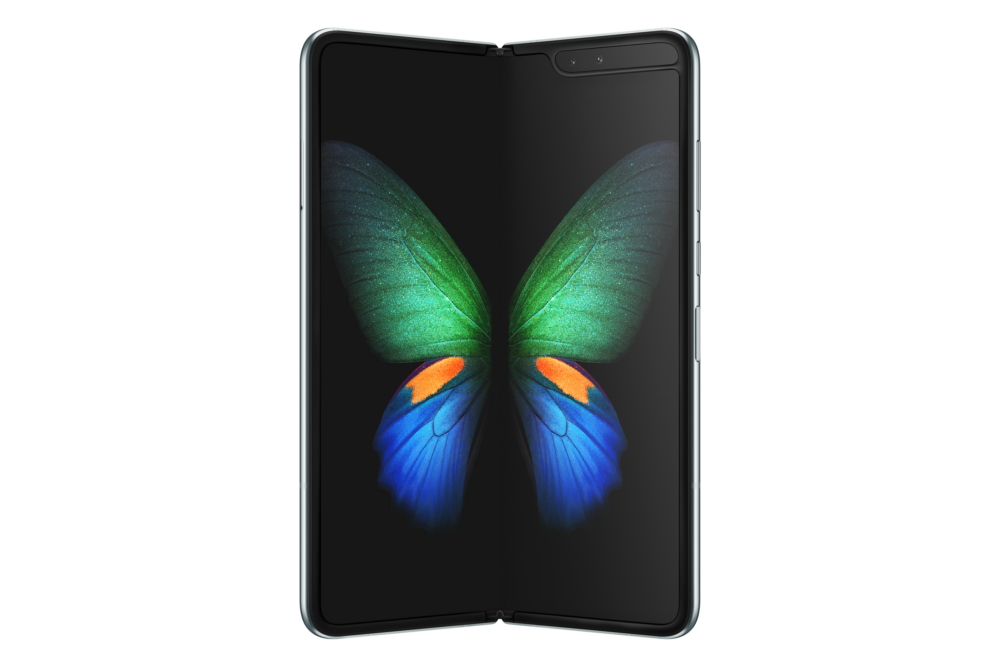
Galaxy Fold Ready for Launch Starting from September

At Samsung, we’ve always focused on pioneering the next generation of mobile innovation: new products and technologies that push the entire industry forward and help users do what they can’t. Earlier this year, we announced Galaxy Fold—Samsung’s first foldable device, and the beginning of an entirely new mobile category. Since then, we’ve made improvements to Galaxy Fold to ensure consumers have the best possible experience.

Samsung has taken the time to fully evaluate the product design, make necessary improvements and run rigorous tests to validate the changes we made. These design and construction improvements include:


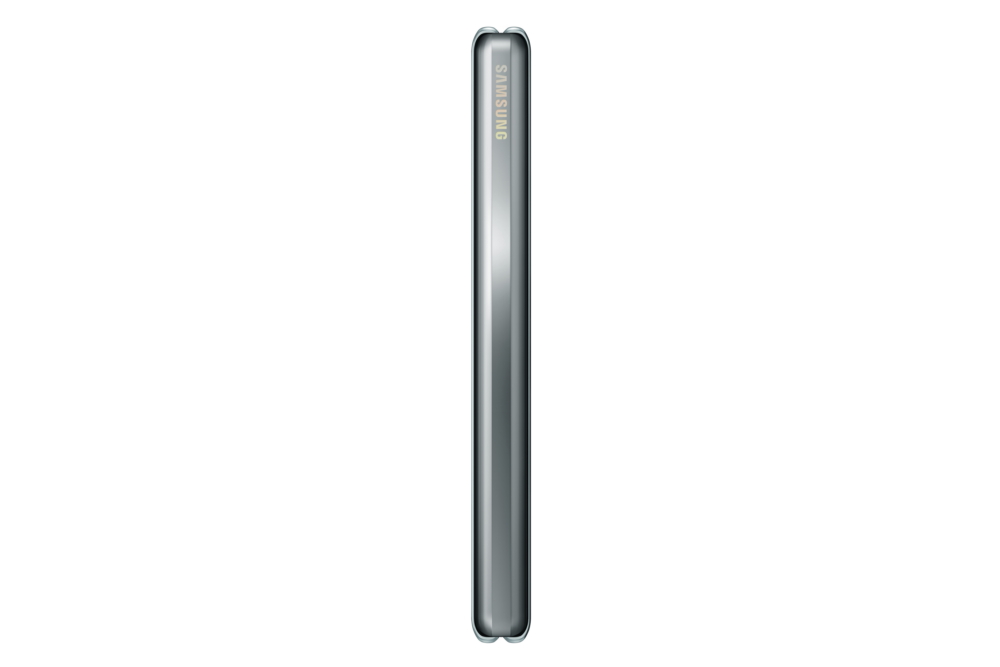
  • The top protective layer of the Infinity Flex Display has been extended beyond the bezel, making it apparent that it is an integral part of the display structure and not meant to be removed.

  • Galaxy Fold features additional reinforcements to better protect the device from external particles while maintaining its signature foldable experience:
    • The top and bottom of the hinge area have been strengthened with newly added protection caps.
    • Additional metal layers underneath the Infinity Flex Display have been included to reinforce the protection of the display.
    • The space between the hinge and body of Galaxy Fold has been reduced.

Along with these improvements, Samsung has also been continuously working to improve the overall Galaxy Fold user experience, including optimizing more apps and services for its unique foldable UX. Samsung is conducting final product tests to make Galaxy Fold available to consumers starting from September in select markets. Availability details will be shared as we get closer to the launch.

Galaxy Fold completely reimagines the smartphone, changing the way you interact, communicate and experience everyday life. Precisely refined, slender and encased in luxuriously finished materials, Galaxy Fold lets you totally immerse yourself to whatever you need, wherever you are in the palm of your hand. Access your essentials on the cover display while holding Galaxy Fold comfortably in one hand, and open it up to use multiple apps at once. Now, with Galaxy Fold, you can review charts while talking on a video call, and search information, all at once.

All of us at Samsung appreciate the support and patience we’ve received from Galaxy fans all over the world. Galaxy Fold is a device long in the making, and we’re proud to share it with the world and look forward to bringing it to consumers.


* This article was originally published here

Tuesday, July 23, 2019

Smarter, Sportier, Snazzier: The Galaxy Watch Active’s Latest Updates

The Galaxy Watch Active allows fashion-forward users to pursue healthy, active lifestyles with ease and style, and thanks to the latest round of software updates, app services and UI that have recently come to the Galaxy Watch Active, users can now get even more out of their device as well as their own daily routines.

Driven by usability thanks to the improved Bixby functionality and sleeker, more intuitive UI, the updated Galaxy Watch Active has seamlessness at its core, meaning that users can pursue their wellness and lifestyle goals with ease. Furthermore, users can stylishly match their daily activities to their Galaxy Watch Active strap thanks to the new range of Strap Studio exclusive watch straps.

With this latest set of updates, Samsung, Strap Studio and other partners are bringing a lifestyle ecosystem straight to users’ wrists that is fully customizable and offers effortless usability.


Smarter Usability

The Galaxy Watch Active’s new software updates make for a more convenient, hands-free Galaxy Watch Active experience thanks to the meaningful improvements made to the Bixby function. Users can now harness Bixby’s comprehensive intelligence to start customized exercise routines, find out time differences between cities and easily control their SmartThings ecosystem – all using the conversational language they favor. Bixby’s task-oriented, personalized UX also learns from your routine and preferred questions, becoming more helpful over time. With these latest updates, you can do more with your Galaxy Watch Active without even having to take your phone out of your pocket.

For an even more seamless user experience, the Galaxy Watch Active’s App Tray UI has been updated to provide a more natural, intuitive format, meaning that users can easily and quickly search the interface and open up the functionality they need. To ensure comfort and convenience during use at nighttime, Goodnight Mode now offers its own dedicated view, and while switched on, users can simply check the time with a single press of a button and can sleep soundly without their downtime being interrupted by notification alerts. Furthermore, Goodnight Mode’s particular settings and alert conditions can be fully customized.

Galaxy Watch Active


More Options for Health & Fitness

So that users are able to get even more out of Samsung Health and its exercise tracking features, the latest Galaxy Watch Active now recognizes Swimming and is able to automatically detect and record a user’s swimming activity, allowing users to easily and seamlessly keep track of more of their favorite workouts.

The latest range of Galaxy Watch Active updates also allows users to get more out of the watch’s Health functionality thanks to the new Heart Rate – Low Alert feature, which notifies users when their heart rate slips below a specific, user-set value for 10 minutes. The UX of Samsung Health’s Breathe Guide has been improved so that users can easily access breathing rate information and guidance pertinent to comfortable breathing.

Galaxy Watch Active


Stylish Straps for Any Occasion

Not only does the Galaxy Watch Active enrich users’ lifestyles with its intuitive fitness tracking software, seamless connectivity and personalized UX, its minimalistic, stylish appearance suits any personality. With the new Strap Studio collection of straps exclusive to the Galaxy Watch Active, users can easily switch between the range of functional yet sleek wrist straps that have been developed specifically for particular activities and pursuits.

Strap Studio’s Active Rubber Collection, featuring a FKM rubber for optimal comfort, is the practical choice for those looking for sophistication as they pursue their fitness goals. The Active Textile Collection has built-in reflective attributes to help with visibility in low-light conditions, perfect for any outdoors pursuit. The Active Leather and Active Leather Dress collections allow users to seamlessly add a touch of class to their looks, thanks to the authentic Italian leather and classic color ranges available.

Galaxy Watch Active


* This article was originally published here

Monday, July 22, 2019

[Video] Capture More with the Galaxy A80’s Rotating Camera


Built for the Era of Live, the Galaxy A80 enhances live interactions, connections and spontaneous self-expression through its compelling innovations, including its rotating camera.

The Galaxy A80 allows users to capture and share the world around them as they see it, when they see it, where they see it. With the Galaxy A80’s rotating camera, excellent quality photos and videos that capture your experiences as they happen are no longer confined to the rear camera. With just a tap, users can harness such rear camera features as 4K UHD Video recording and Super Steady for their selfie capturing.

Check out the video above to see how the Galaxy A80’s Triple Camera module rotates around to bring the vivid image capture and Live Focus capabilities of the 48MP Main Camera, the Ultra Wide Camera and more to users’ front-facing moments and experiences.


* This article was originally published here

Friday, July 19, 2019

Galaxy S8 Assists in Emergency Rescue

Following a recent accident at sea in Cebu, a Samsung Galaxy smartphone proved helpful in securing the safety of 20 people.

On July 8, a boat carrying 16 foreign divers and four Filipino nationals on an island hopping excursion capsized in the waters off Bogo City in Cebu province. About 30 minutes after the boat tipped over, the stranded passengers were able to call for help. They were all returned to shore safely.

The passengers were able to call for help relatively promptly after a Samsung Galaxy S8 belonging to Canadian national Jim Emdee was found submerged in water under the boat. Emdee and the other passengers used the phone to call for help, and provided rescuers with their location using the device’s GPS function.

Following his harrowing experience, Emdee reached out to extend his thanks to the Samsung engineering team, saying, “I really hope my thanks can make it to the engineering team as honestly it really saved us all. Only my S8 was able to connect and it worked all the way until we made it to land. It stayed alive for much longer than I thought possible, and it really made the difference.”
James Jung, Head of Samsung Electronics Philippines said, “We are glad to hear that the passengers are all safe, and that a Samsung phone was helpful in the rescue effort. We will continue to work towards producing devices that can come to users’ aid when they find themselves in dire situations.”

Samsung advises users to keep the GPS locator on their Galaxy smartphones turned on while travelling, especially if travelling alone or in remote areas. Galaxy smartphones also allow users to send SOS messages to designated emergency contacts by enabling the ‘Send SOS messages’ feature (Settings → Advanced features → Send SOS message). With this feature turned on, users can tap the power button three times quickly to send out an SOS message to up to four emergency contacts.

* The Galaxy S8 is certified as water resistant in fresh water up to 1.5 meters deep for up to 30 minutes. Neither beach nor pool use is advised. Water and dust damage are not covered by the device’s warranty.


* This article was originally published here

Wednesday, July 17, 2019

7 Pawesome Tips for Improving Your Summer Photography with the Galaxy S10


Filled with sandy beaches, blossoming flowers, and lazy days by the pool, it is no wonder that summer is peak picture-taking season.  The longer days marked by early sunrises and late sunsets mean you’ve got even more daylight to work with than any other time of year.  But although popular summer vacation destinations are ripe with creative possibilities, they’re also bursting with overdone clichés. Thankfully, the Galaxy S10 is here to help.

Featuring triple rear cameras with Telephoto, Wide, and Ultra Wide lenses, and a variety of camera modes to support your creativity, such as Super Slow-mo and Live Focus, the Galaxy S10 is the perfect device for capturing summer memories. And what better way to spend the dog days of summer than with a furry companion? We teamed the Galaxy S10 up with an adorable Corgi to show you tips and tricks for taking summer photos that stand out.


1. Take Beach Portraits with Live Focus

Samsung Summer photography tips
In addition to Background Blur, new Live Focus modes give users the power to add an artistic touch to their photos. Starting from the top left: Color Point, Background Blur, Spin, Zoom

Nothing captures a summer day at the beach quite like the unbridled joy of a canine smile – and nothing captures those smiles quite like the Galaxy S10’s Live Focus feature. Originally designed to give you the power to add background blur to your portraits, the Galaxy S10 offers a new selection of blur effects, allowing you to create a variety of artistic photos.

The new effects include zoom, spin, blur and color point. The latter option makes your subject stand out by keeping them in full color while painting the rest of the photo in black and white. When shooting in Live Focus mode, the new background options, as well as a slider that allows you to adjust the intensity of the effect you want to apply, appear just above the shutter button.

You can preview your selections in real-time, but if you’re still not happy after you take the shot don’t worry – you can choose a new effect and make adjustments in the Gallery app even after you’ve taken the picture.


2. Fit the Whole Shoreline in with the Ultra Wide Lens


Summer Photography tips


While you’re enjoying a morning walk down the beach with your pup, make sure you spend some time taking in the scenery with the Galaxy S10’s Ultra Wide lens. Whether you’re trying to capture dramatic skies, or expansive shorelines, the 16MP Ultra Wide lens offers a 123-degree field-of-view so you can make your summer photos more interesting. Simply enter the camera app and click on the icon with three trees above the shutter button to use the Ultra Wide lens.


3. Get a Dog’s Perspective with Super Steady


Have you ever wondered what the world looks like from your dog’s point of view? The next time you’re out for a walk in the park, you can capture their perspective with the Galaxy S10’s Super Steady video stabilization, which allows you to record video without any shakiness. Super Steady can be toggled right in the Video menu and, once turned on, allows the Galaxy S10 to optimize your recording, whether you’re bombing downhill on a bike or capturing a booty-shaking corgi on a summer evening walk, so you get fluid, steady action in your videos every time.


4. Capture that Puppy Love in Ultra-High Definition

Camera Tips

White, fluffy clouds are rolling through blue skies, a breeze is blowing through the trees and fresh green grass, and your dog just can’t help but thank you for sharing the day with a big goofy smile. Every dog owner knows the happiness those moments can bring and now you can share them with your pup in ultra-high definition with the Galaxy S10’s 10MP, UHD Dual Pixel AF Selfie Camera that delivers true- to-life image quality.


5. Post Your Best Shots Straight to Instagram

Photography tips

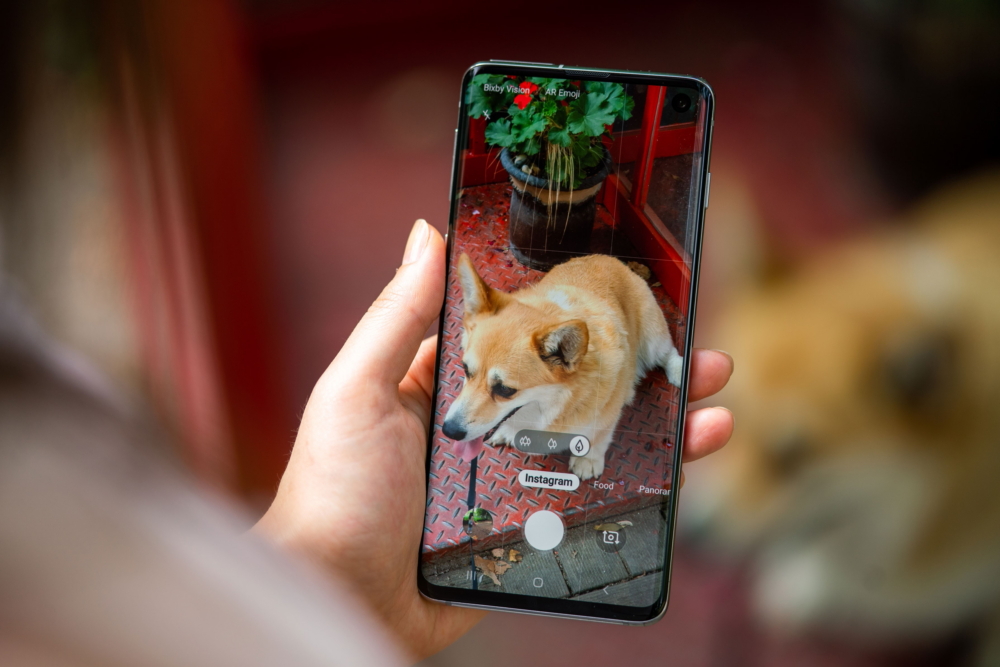
Our best memories deserve to be shared, and the easiest way to show your friends and family what you’re up to is by posting straight to Instagram social media with the Galaxy S10’s Instagram mode. You will first have to install the app and set up an Instagram account for the option to appear in the menu above the shutter button in the Samsung Camera app. Once your account is ready, simply select the Instagram mode from the menu, take your photo or video, and you will be taken directly to Instagram where you can share what you captured in your Instagram Stories.


6. Shoot Stunning Sunsets at the Park


Summer Photography Tips Summer Photography Tips


One of the best parts of summer is taking in the purple and pink skies of late evening sunsets – but getting crisp shots can be difficult in the fading light. As the above images shot with the 12MP Wide main camera demonstrate, the Galaxy S10 is capable of delivering incredible low-light performance. With an F1.5 aperture and larger 1.4 µm pixels, the camera is able to capture more light so you and your furry friend will be photographed in full detail while you’re catching the last rays of daylight. In addition to the Galaxy S10’s professional low-light performance, it also features a dedicated Night Mode for especially dark conditions to give your night shots a boost.


7.  Slow Down Summer with Super Slow-mo


Summer vacations might be relaxing, but time still moves too fast to capture those precious moments that happen in the blink of an eye – and what could be more precious than a corgi in a floating rubber ducky? The Galaxy S10’s Super Slow-mo is the perfect tool to capture those moments, shooting in 960fps and capable of extending 0.4 seconds of action into a 14.8 second clip. Choose the Super Slow-mo option from the menu above the shutter button in the Samsung Camera app and hit record. After capturing the action, the Galaxy S10 processes it for you and produces a Super Slow-mo video in 720p HD resolution ready for your next social media post.


* This article was originally published here

Tuesday, July 16, 2019

[A Journey Towards A Sustainable Future] ① Samsung’s Global Green Management Initiatives

Sustainable business is a corporate priority that pursues sustainability by driving company initiatives in the social, economic and environmental fields outside of profit-seeking enterprise. In the early 21st century, as demand for corporate social responsibility in the environmental field grew, sustainable business became a paradigm essential to a company’s survival. Samsung Electronics was no exception. Samsung marks its 50th anniversary this year, and the company is continuing its best efforts to fulfill its duty as a global citizen in the areas of the environment, product responsibility, sustainable supply chains and social contribution. Samsung Newsroom is detailing the company’s sustainability-led activities in a dedicated series, beginning with the company’s environmentally friendly initiatives.

The importance of pursuing environmentally friendly activities for a company on the scale of Samsung Electronics cannot be underestimated in terms of the potential for leading the way in mitigating such global issues as climate change and resource depletion. For this reason, environment-related activities and initiatives lie at the heart of Samsung’s sustainable business practices.


Taking A Green Approach Since the 1990s

Since its Environment Declaration in 1992, Samsung Electronics has been managing its ‘green’ business in order to fulfill its environmental responsibilities understanding that any expense put towards fighting environmental issues is not an optional, but instead a necessary, corporate investment.

In 1998, the company established its own E-Waste Take-Back and Recycling Centers to promote the efficient use of waste products, pioneering this program in the domestic electronics industry. In 2004, the company advanced its development of environmentally friendly products by introducing the Eco-Design Process, an appraisal that assesses the energy efficiency, resource efficiency and environmental damage of a potential product right from the beginning of the product development cycle. In 2005, Samsung’s Environment Analysis Lab was established to put in place a system that keeps track of whether hazardous substances are included or not in a product’s development process, from specific parts and components through to completed products.

As a result of these initiatives, in 2009 Samsung was able to introduce Green Memory, a high-speed, low-power and highly reliable semiconductor solution. If all global servers were to implement the 5G Green Memory Solution as of 2014, 45 TWh of electricity would be saved overall annually, and the environmental effect would be equivalent to planting an additional 800 million 10-year-old trees. Samsung’s Quantum Dot TV, launched in 2016, was the first TV product to not use cadmium, a material found to be harmful to both the human body as well as the environment. Such competitive edges were maintained in the launch of the QLED TV in 2017 and QLED 8K in 2018, making Samsung a market leader in terms of industry innovation as well as sustainability.

Furthermore, Samsung’s Galaxy Upcycling program provides an alternative method for resource circulation by repurposing used smartphones as IoT devices with new functions. Efforts such as this that the company continues to propagate has led to global recognition, with the company winning the United States Environmental Protection Agency’s ‘Champion Award: Cutting Edge’ in 2017 for its game-changing work in electronics sustainability.


Samsung’s Practices on Sustainable Products and Business Operations

Since 2005’s Kyoto Protocol, brought about to reduce global greenhouse gas emissions, Samsung has been accelerating its environmentally friendly endeavors in order to help reduce emissions. In 2009, Samsung announced its green business vision and intermediate goals in order to lead global response to this environmental regulation with a focus on low carbon emissions and ‘green’ growth.

From 2009 to 2018, the use of high-efficiency products saw the company reduce its accumulated greenhouse gas emissions by 243.1 million tons. This is equivalent to the greenhouse gas emissions of 1.5 billion people’s refrigerator usage over the span of an entire year.1 By establishing a circular resource economy system, as of last year 54 countries participated in taking back end-of-life products from Samsung customers. About 3.55 million tons of e-waste was collected cumulatively from the take-back program between 2009 and 2018. In addition, an accumulated amount of 220,000 tons of recycled plastic went back into Samsung products in the same time period.

With 216 business bases in 74 countries, Samsung not only works on managing the environmental impact of its products, but also on developing environmentally friendly business establishments. In June 2018, Samsung announced its goal to use 100% renewable energy across all its establishments in the US, Europe and China by 2020, as well as to install 63,000 m2 of solar and geothermal power facilities in Korea. In October 2018, Samsung’s U.S. headquarters, as well as all US Device Solution manufacturing plants converted to using energy from 100% renewable sources, and the company’s Slovakian worksites have since followed suit.

Samsung Electronics’ green business achievements over the last 10 years are summarized in the infographic below.

Samsung Sustainable future Journey

Samsung Electronics published its 2019 Sustainability Report on June 28. The entire report can be downloaded here.

1 This figure is calculated from the global sales and greenhouse gas emission per product based on the average power consumption of domestic refrigerator models sold by Samsung Electronics in 2018


* This article was originally published here

Monday, July 15, 2019

[Tech Lab Notes] Inside the Galaxy A80’s Revolutionary Rotating Camera

A camera that rotates presents itself as the perfect camera solution for smartphone users in the Era of Live as not only can it expand the rear camera experience to front-facing pictures and videos1, but it can also allow for a true full-screen experience for users to fully engage in their favorite content.

And so, Samsung brought its first rotating camera module to the Galaxy A80.


What Goes Around, Comes Around

Developing a smartphone with a rotating camera was a unique challenge. Existing technologies dictated that in order for a camera to slide up and then rotate from within its device, two motors would be required – an impossible addition to a smartphone given the amount of space for parts this would require.

In order to mitigate this, Samsung developed a solution requiring no extra motor parts that also ensures no premature rotation occurs, thanks to a mechanism complete with locking ‘teeth’, rail and hook. These innovative technologies then entailed an optimization of the motor to ensure it could power the camera’s vertical slide and rotation.

Samsung Galaxy A80


Captivating Camera Quality

The Galaxy A80’s rear camera module features a 48MP Main camera, an Ultra Wide angle lens camera and a 3D Depth camera so that users can capture any moment just as they see it. And when users select selfie mode in the camera app, the rotating camera mechanism brings a powerful triple camera experience to front-facing pictures and videos, too.

In addition to this hardware innovation, Samsung’s engineers understood that using the same lenses for both front and rear perspectives would require optimization of the camera module, as the functionalities of these camera perspectives are different. Therefore, the Galaxy A80’s camera software has been optimized to ensure that the picture quality of the camera is suitable for rear-taken, landscape shots as well as close-up, undistorted selfie pictures.


Ensuring Exceptional Camera Experiences

In order to assess whether these solutions could withstand extensive use for each and every spontaneous selfie moment, the Galaxy A80’s rotating camera underwent full and thorough testing at a dedicated Samsung lab.

Galaxy A80 devices were put through a multitude of quality-testing use case scenarios designed to verify that the hardware and software innovations of the device were able to consistently provide the best camera experience possible, even after extensive use.


Galaxy A80 smartphones undergo quality testing to ensure that the rotating camera, with its bespoke hardware and software innovations, can still provide its best camera experience to users even after extensive use.

In developing the camera module hardware and software for the Galaxy A80, Samsung wanted to create a camera that was able to help people capture what they see, when they see it, how they see it. The Galaxy A80, with its innovative rotating camera, is a smartphone built to enhance spontaneous interactions and support self-expression without limitation in the Era of Live.


1 Functionality of the Galaxy A80’s rotating camera module when on front-facing mode differs from the functionality offered on rear-facing mode.


* This article was originally published here

Monday, July 8, 2019

The Bixby Marketplace is Now Officially Open in the inthe U.S and Korea

The Bixby Marketplace

The Bixby Marketplace is a one-stop shop for users to browse and add a wide range of services (known as capsules) to enhance their Bixby experience.

This new platform is now open to users in U.S. and Korea. The Bixby Marketplace’s official launch lays the foundation for an open ecosystem of useful services that developers will continuously enrich, and users will be able to make their mobile experience more personal and intuitive.

The key to Bixby’s convenience is simple: customization. Samsung’s intelligence platform is designed to learn what you like to do, and then work with your favorite apps and services to help you get more done—faster.

The Bixby Marketplace takes these customized experiences to the next level by offering easy access to a wide range of capsules that make Bixby more powerful, making it easier for users to tailor Bixby to suit their needs. The Marketplace includes a variety of convenience-enhancing capsules such as Google Maps, Spotify, iHeartRadio, NPR, Yelp and more.

Bixby Marketplace


How It Works

Users access the Bixby Marketplace from the Bixby main page. Once the user launches the Bixby main page by pressing the Bixby key, they swipe left to get to the Bixby Marketplace. Capsules are organized by categories such as Productivity, Business and Finance, Sports, Shopping, etc.

Searching by capsule name, developer or keyword makes it easy to find the capsules you need, while curated staff picks and user reviews highlight capsules that users will find particularly useful. Capsules can be added with a single tap of a button, and users can also rate and review capsules to ensure the highest quality Bixby capsules are the most visible to users in the Bixby Marketplace.

To add even more customization, users can set a capsule as the “preferred capsule” for certain types of requests. For example, if a user says “Get me a ride to San Francisco airport”, Bixby will prompt the user to pick one of the supported Rideshare capsules. Users will have the option to set their favorite provider as their preferred Rideshare capsule. Once that is set, any Rideshare request would automatically go to the user’s preferred provider, even if the user does not mention the capsule name. The ability for users to customize their own personal Bixby experience allows them to easily incorporate a wide range of capsules into their everyday lives.


What’s Next?

Samsung will continue to improve the Bixby platform and evolve the Bixby Marketplace to support developer needs and enhance the experience for all our users. Developers will continue to add more capsules to the Bixby Marketplace over the next few months. Samsung plans to share more exciting updates at Samsung Developer Conference 2019 (SDC19) which will be held on October 29–30 in San Jose, California. Stay tuned!


* This article was originally published here

Wednesday, July 3, 2019

[Invitation] Samsung Galaxy UNPACKED 2019: The Next Galaxy


On August 7, Samsung Electronics will unveil new devices designed to take the Galaxy ecosystem’s connectivity to the next level.

The reveal will take place at the Samsung Galaxy Unpacked event in New York.

Live streaming of the event will be available at www.news.samsung.com/global, www.samsungmobilepress.com, www.samsung.com/galaxy and www.samsung.com.


* This article was originally published here

Saturday, June 22, 2019

Samsung’s Award-Winning T-Series COB LED Delivers Finely Tunable Lighting Solutions

Interest in “emotional lighting” is steadily increasing as light is considered to be one of the key elements with which to create an atmosphere of personal intimacy. Accordingly, the majority of retail stores switch out their lighting from time to time to help display themselves in a more personable and emotional way.

LED tunable lighting solutions are a prime means of enhancing an emotional atmosphere in that they allow the user to change the ambience of a space without having to add another light or replace a bulb. Most of these tunable lamps use LED modules with two color temperatures to generate a range of inviting light variations.

Samsung Electronics’ new ‘T-series’ chip-on-board (COB) LED features superb white-color tunability within a single LED package by using advanced phosphor technology and chip-scale packaging design, which together take color mixing to new levels. Consequently, lamps using Samsung’s T-series LEDs can provide industry-leading light efficacy with significantly enhanced color quality.

In the T-series, chips are covered completely in green phosphor, which enables lights with different color temperatures to blend and produce a homogenous color, eliminating the need for a diffuser. Conventional tunable LED modules require a diffuser for smooth color mixing, adding another layer for the light to pass through and causing a drop in the light efficacy levels.


Samsung’s COB design allows the T-series to offer a high rate of light output per light-emitting surface (LES) and low thermal resistance in a single LED package. Additionally, its unique, concentric circle chip arrangement provides high uniformity. These qualities make the T-series ideal for a wide range of indoor lighting applications – particularly those in retail stores, boutique hotels and coffee shops where high-quality spotlighting is essential to enhance an appealing spatial ambience.

Thanks primarily to these outstanding color mixing features, Samsung’s T-series LED modules won at the 2019 LIGHTFAIR International (LFI) Innovation Awards in the category of LED/OLED Chips and Modules, and were also honored with the prestigious Judges’ Citation Award.


Note: The trophy is displaying the former product name at the time of award submission, the E-series, which has changed to the T-series.


Samples of this award-winning T-series are now available worldwide, with three variations in luminous flux level and LES size.


* This article was originally published here

Friday, June 21, 2019

[Editorial] Dreamers with Purpose: How to Connect with the World’s First True Digital Natives

Dreamers with purpose

For every brand, generational change is a big challenge. Who is this new generation? What motivates them? How are they different from the rest of the population? Right now, we have to get ready for Gen Z, a generation of young people born after 1996 who are now joining the global workforce and have become an important group of consumers.

Most people I speak to are surprised when I tell them that Gen Z already numbers nearly two-and-a-half billion people. That’s more than the much-discussed Millennials. For us at Samsung, generational change is nothing new. We are in our 50th year as a company, and truly understanding consumers – their wants, needs and aspirations – has always been at the heart of our innovation. The way I see it, Samsung is not so much about the technology we create; rather, it’s about giving people the tools they need to do what they can’t.

Still, with every generation, we have to rethink how we can make that happen. After all, the relationship between brands and consumers is constantly changing, so we have to ask ourselves: what do we need to do to remain relevant?


A Generation of Dreamers

Every generation is unique in its own way, and Gen Z is no different. But I thought it would be useful to share some of our insights into this new generation, because I believe that their values and their motivations are very close to what Samsung stands for.

We started our research by asking who Gen Z are. Yes, they are highly diverse and unique, but what have they got in common that drives them? What do they value the most? We did surveys, and we spoke to many of them directly, really listening to what they had to say.

What we learned is that Gen Z is a very resilient generation. They’ve grown up during an economic downturn and global crises – but they haven’t given up hope. In fact, they are determined to change the world for the better.

So, they are dreamers, but they are dreamers with purpose. They know what they want and are passionate in what they stand for, and they expect the same from brands. They dream big, and we must dream with them.


The Era of ‘Storyliving’  

For this new generation of change-makers, it isn’t enough for brands to simply have great products or services. Gen Z cares about a brand’s values and how they measure up against their own. Seventy-seven percent of them believe that ‘doing good’ should be an integral part of running a business. This means that brands can no longer just focus on storytelling, for this is the era of ‘storyliving.’

Here at Samsung, we’ve had to really consider how our own values match up.

Gen Z is a generation that dreams of defying barriers – and so do we. “Do What You Can’t” is our rallying cry. It embodies what we stand for as a brand, and I think that resonates perfectly with the Gen Z outlook.

With a mindset of relentless innovation, we continue to seek out new opportunities to create experiences that can change people’s lives.

This is about so much more than just technology. It’s about the value we deliver. Whether that’s with the Be Fearless virtual reality app, which helps people tackle their deepest fears, such as a fear of public speaking or height anxiety, to the Samsung Blind Cap, which enables Paralympic swimmers to receive cues from their trainers indicating when to flip at the end of their lane.


Defying Barriers

Gen Z are mankind’s first true digital natives. They don’t know a life without the internet, and using technology is completely natural to them. I find that very exciting, because I really do believe that they are going to unlock the potential of our technology like no generation before.

They are going to use technology to reach new heights, and we are going to be right there with them on that journey. 

We connect with them by helping them succeed. And that starts with what we do best: listening and understanding. We want to help them achieve their potential with whatever tool, skill or lifehack they need.

But Gen Z is about as diverse as can be, and Samsung is a global brand that must cater to the individual on an international scale. In every region, country and even community, we take our core values and apply them on a local level to address specific needs. 

In Kings Cross, London, an exciting project is underway that really showcases what this looks like.

Samsung is creating a new space in an area that has already undergone big changes, leaving some locals feeling disconnected. We want to help – not by prescribing solutions, but by listening and helping where there’s a need. That’s why I don’t see Samsung Kings Cross as a store, but as a hub of culture, innovation and learning. We’re even recruiting staff that can speak all the different languages found in the local community – including British Sign Language, because there is a large school for the deaf nearby.

We will listen to this new generation, and we will help them drive positive change, achieve their potential, be responsible citizens, and dream… with purpose.

Our goal is to be an authentic, relevant brand that resonates with Gen Z. I’m confident that we can do that, because social purpose has always been a part of Samsung’s DNA.


* This editorial is based on YH Lee’s address at Cannes Lions 2019.


* This article was originally published here

Thursday, June 20, 2019

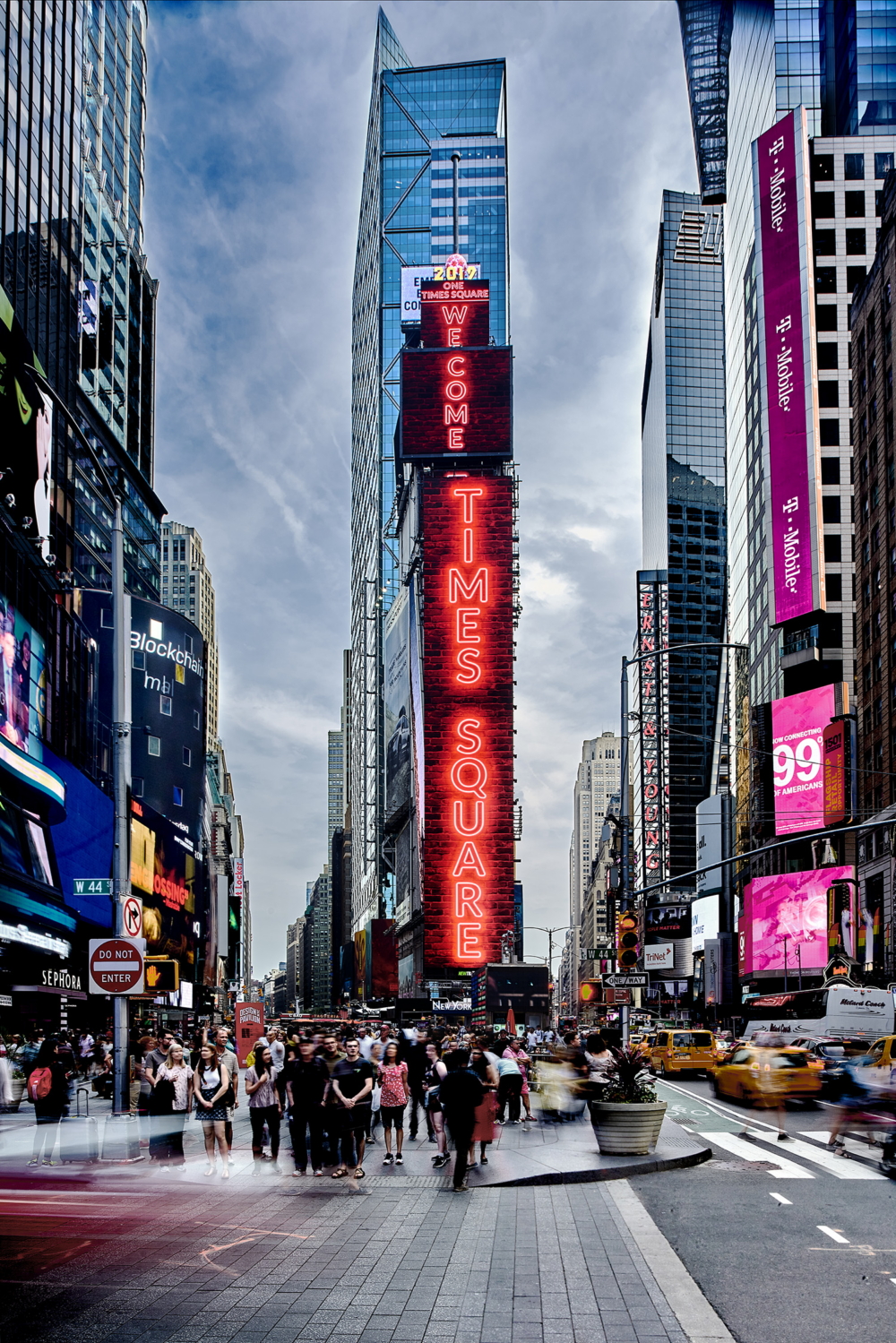
Samsung Installs Momentous New LED Displays in the Heart of New York`s Times Square

New York Times, Square

Samsung Electronics completed a massive state-of-the-art five-screen LED display installation at the iconic One Times Square building in New York City on May 31, 2019. The new high-end displays from Samsung measure more than 11,639 square feet (1,081 square meters) when combined.

Samsung’s new displays at One Times Square take up the entire front facing panel and reflect some of the most valuable advertising displays in the world. The displays feature premium center-stage exposure with full motion video, live-streaming and interactive capabilities.

“We are excited to showcase our LED displays at one of the world’s most renowned destinations, said Seog-gi Kim, Executive Vice President of Visual Display Business at Samsung Electronics. “New York’s Times Square is not only a high-traffic location, it is a symbolic center of culture and commerce, making it the ideal place to showcase our leading technology on such a colossal scale.”

Jamestown, a real estate investment and management company, owns and manages the property One Times Square, the 25-story building located in the heart of Times Square in New York City. Home to the New Year’s Eve ball drop, the globally recognized building has been central to New Year’s Eve traditions celebrated around the world.

“One Times Square serves as an advertising platform for the world’s most iconic brands,” said Michael Phillips, President of Jamestown. “Samsung delivers a best-in-class visual experience that will showcase these brands in the highest quality.”

PRISMVIEW, a subsidiary of Samsung Electronics America, was responsible for the design, supply, manufacturing and installation of the project. Last year, Samsung also completed installation of outdoor LED signage at Two Times Square, located opposite from this recently completed project.

Samsung’s SMART LED Signage XPS Series features a reinforced design to deliver uninterrupted color-uniform content in any setting. The XPS 160 and XPS 080 models used at One Times Square feature advanced color calibration, an energy-saving design and the industry’s highest-quality, tier-one LED diodes.

A time lapse video highlighting the three-month transformation process was created to capture the accomplishment, showcasing the visual impact of the displays from day to night and their durability that can withstand extreme weather conditions.

For more information about Samsung’s visual display solutions visit: https://displaysolutions.samsung.com


About Prismview, a Samsung Company
Prismview is a subsidiary of Samsung Electronics Co., Ltd. Founded in the early 1990s as YESCO Electronics, acquired in March 2015, and rebranded as Prismview, A Samsung Electronics Company. Prismview designs, engineers and manufactures large-format LED video display solutions out of its Logan, Utah, USA headquarters. Prismview offers a diverse line of technology solutions, integration and operational services for a variety of applications, including sports and live event venues, digital out of home applications, digital billboards, spectaculars and gaming, and LED message center displays. Learn more about Prismview at www.prismview.com.

About Jamestown
Jamestown, LP was established in 1983 as an investment and management company focused on income-producing real estate in the United States. Over the last 35+ years, Jamestown has grown its portfolio of assets in key markets throughout the U.S. and expanded its investment footprint to South America and Europe. Jamestown’s capabilities include: acquisitions, capital markets, property management, asset management, retail leasing, design, sustainability, and risk management. Jamestown has headquarters in Atlanta, GA and Cologne, Germany, and offices in New York, NY, Boston, MA, San Francisco, CA, Los Angeles, CA, and Bogota, Colombia. For more information, visit www.jamestownlp.com.


* This article was originally published here