Thursday, June 11, 2020

WWDC 2020: All the Features & Devices We Expect to See at the Next Apple Event

WWDC 2020: All the Features & Devices We Expect to See at the Next Apple Event

Apple showcases new software for its devices every June at the World Wide Developers Conference (WWDC), a mecca for developers and system engineers eager to learn about changes for the year ahead. The event traditionally commences with a keynote by Apple's CEO, Tim Cook. While not as captivating a showman as Steve Jobs, Cook's enthusiasm for his company and talented teams is infectious. This year, due to the coronavirus pandemic, WWDC will be an entirely virtual event, with both sessions and the June 22 keynote held online. In keeping with tradition, Apple should debut the next version of iOS, iPadOS, watchOS, tvOS, and macOS at WWDC. In anticipation of the new releases, I've collected the top rumors and leaks for this year's announcements, along with some wishful thinking and speculation. Let's open the rumor window to the future and see what Apple might share with the world this June.

Related: WWDC 2020 Apple Keynote: When & How to Watch the Next Apple Event

iOS 14 Rumors

iOS 14 Public Release Dates

Expect Apple to release beta versions of iOS 14 over the summer and the official shipping versions of iOS 14 late September. Given that every other Apple OS is named for the platform it runs on, it’s possible Apple could rename the iOS to iPhoneOS.

Which iPhones Will Work with iOS 14?

MacRumors reports that iOS 14 will run on the same iPhone hardware that runs the current operating systems. The exception is the iPad Air 2 and the iPad Mini Series 4, which use older A8 and A8X chips. If this is true, that means even my 2016 iPhone SE should run iOS 14. 

New iOS 14 Features & Improvements

HomeKit

Expected HomeKit improvements include easier Scene management and device control. There are also rumors of facial recognition support for high-end HomeKit-enabled cameras. However, given Apple's guiding principles on privacy protection and the ongoing debate on unauthorized surveillance along with the high percentage of false positive recognition analysis, I suspect that Apple will punt such responsibilities to third parties while requiring users to accept the necessary operating system permissions so they're aware of the privacy considerations around this technology.

Security Upgrades

Apple made big news in the security community in February when it announced that, beginning in September, Safari would no longer connect to sites with Transport Layer Security (TLS) certificates that are more than a year old. This requirement will change how websites manage and renew their security certificates. It also shows just how much leverage Apple has to force the global internet to change with Apple's requirements. Emboldened by this authority, Apple will no doubt project its intentions on other areas of web security best practices. Expect to hear more Safari privacy and security feature announcements at WWDC. 

I'm hopeful that Apple will require more secure Domain Name System (DNS) protocols to help prevent imposter websites from  fooling your browser into thinking it’s a legitimate banking website. I'd also like to see a new release of Apple's Intelligent Tracking Prevention that prevents websites from fingerprinting and tracking your browser as you surf. I also expect Apple to announce deeper, more seamless integration of its "Sign in with Apple" identity protection service.

Making 3rd-Party Apps the Default

A dream feature that Apple might announce at WWDC is the ability to manually set a third-party app as your default web browser, email platform, music player, and calendar, something Android has supported from the beginning. Today if you’ve installed Google Chrome or Microsoft Edge on your iPhone, you are still forced to launch and use Safari when accessing web links in messages, emails, or other programs. Rumor has it that soon, Apple will allow you to set some third-party apps as the default on the iPhone, iPad, and even the HomePod. The question is, would that third-party support go so far as to integrate Siri's voice commands? If third-party support really is coming to the HomePod, then the answer is probably yes.

Widgets on the iPhone Home Screen

Speaking of iOS features borrowed from Android, home page widgets are anticipated to appear on iOS. They made a moderate splash on iPadOS, so migrating them to the smaller iOS screen would seem like the next logical step, especially since this functionality has also existed on Android since the initial Android 1.0 release in 2008.

Add Celebrity Voices to Replace Siri?

Another long-featured Android differentiator has been the ability to set a custom voice to replace the default speech synthesized voice. Custom voices could be added to iOS via a detected VoiceProvider API. Doing so would allow iOS users to swap out the voice of Susan Bennett, the vocal artist whose voice has been immortalized as the US English voice of Siri, with other voices from third-party providers. It wouldn't be much of a stretch to conceive the idea of having the voice of celebrities like Tom Hanks, Scarlett Johansson, and others be the new voice of Siri. Of course in that scenario, it would be more appropriate to trigger Siri with the phrase "Hey Tom" instead!

Find My Gets Scheduled Location Alerts

New features in Apple's Find My app are expected to support schedule location alert triggers. For example, if you expect your child to be at a bus stop at a certain time of day, Find My could alert you that they either are or are not there at the expected time. Find My could also be a participant in COVID-19 contact tracing by allowing the app to find all those authorized friends and family who may have come into contact with you during a set duration of time in the event of a positive test result.

Smart Car Locks

Other lrumored new features include the CarKey API, giving iOS users the ability to locally lock/unlock car doors, as well as granting trusted iOS carrying family members and friends with temporary unlock code access. This is essentially a mobile extension of what several Homekit-aware smart door locks for the home already offer.

For even more details about the latest iPhone operating system, check out our full iOS 14 rumor roundup!

iPadOS 14 Rumors

iOS 14 Public Release Dates

Expect Apple to release beta versions of iPadOS 14 over the summer and the official shipping versions of iPadOS 14 late September. 

Which iPads Will Work with iPadOS 14?

iPad hardware that run the current iOS 13 and iPadOS versions, with the exception of iPads using the A8/A8X chip such as the 2014 iPad Air 2 and the 2015 iPad Mini series, are expected to be compatible with iPadOS 14. Compared to the few remaining Android tablets on the market, that's quite a long support term and one of the main reasons I continue to recommend iPads as the dominant and best supported tablet platform.

Using the iPad Will Be Even Closer to Using a Macbook

Most of the iOS 14 features expected to be announced, will be included in iPadOS 14 as well with added UI improvements specifically for the iPad platform. Apple's recent addition to support mice and trackpads in iPadOS also makes it clear that Apple intends to make iPadOS the successor to macOS, and perhaps in a few years, the two operating systems will merge into a single unified next generation OS.  But for now, the incremental improvements Apple is expected to announce at this year's WWDC include the following. 

Desktop Browsing Experience

The iPadOS could also use improvements in the full desktop browsing experience of Safari, so we could forget we're surfing the web with a tablet versus a macOS-powered laptop. Such changes would bring the iPad even closer to the functionality of a laptop.

Better Mouse Support

Expanded mouse and keyboard support, including more trackpad gestures and additional support for third- party mouse and trackpad accessories, will also make give iPad users more of a laptop experience. Smarter Apple Pencil detection, tip tracking, better palm rejection and expanded third-party stylus support are likely too.

App Development on the iPad

The most impactful iPadOS 14 rumor is the ability to run Apple's XCode integrated development environment on an iPad.  Official support for this would be huge, since doing so would no longer require iOS developers to have access to a modern Mac computer in order to develop iPhone, iPad, watchOS or tvOS apps. 

New Hardware

Hardware announcements typically take a back seat during WWDC because the conference is intended for developers to learn the new features and API's of the next release of Apple operating systems. Apple usually only announces new products at WWDC when those products require active developer involvement to mature the platform before its release. With that in mind, here are the possible hardware announcements we may see at WWDC 2020.

Apple Watch & watchOS

A new version of the Apple Watch may also be announced to coincide with improvements being made to watchOS. Apple has positioned the Apple Watch to be the personal health-monitoring assistant, and there have been long-rumored attempts to develop a non-invasive blood glucose monitor that could be a huge enhancement to life quality for existing diabetics. It could also warn individuals of pre-Type 2 diabetic conditions so they can change their lifestyle before its too late. And until a vaccine is widely available to combat the deadly impact of COVID-19, new social distancing features in the Apple watchOS could use proximity sonar to inform when others are breaking through the six-foot protective barrier. The watchOS could also support opt-in contact tracing when the iPhone is unavailable the same way that the LTE watch stays connected to the web when the iPhone's internet connection isn't accessible.

AppleTV &tvOS

Apple TV hardware may also be receiving a new SKU to evolve its support for the latest HDR and 8K content resolutions. More internal memory and a faster GPU to support these higher specs will also allow iOS/tvOS game developers to take advantage of the hardware improvements for more immersive gameplay experiences. tvOS is expected to include the additional HomeKit and multi-factor security-related improvements that iOS 14 is rumored to receive.

HomePod Mini

Apple is rumored to be working on a smaller, less expensive version of its HomePod. Due to the limitations of Siri compared to Amazon's Alexa-powered or Google Assistant-powered home speaker products, HomePod hasn't nearly had the market penetration and acceptance that Amazon and Google assistant speakers have. Besides Siri's perceived lack of intelligence compared to Amazon and Google, the other major limiting factor is HomePod's excessive price. Sure, the audio quality is impressive, but considering Amazon and Google sell comparable audio products at half the price with much smarter backend AI, Apple is way behind the curve in this product category. HomePod Mini may be a way for Apple to address both the price disparity and reintroduce a reconstructed Siri with impressive, developer-extendable smarts.

StudioPods

Another product releases that might be mentioned only in passing may be a high-end, over--ear headphone with the rumored name of StudioPods. These would compete with high-end headsets from Bose and Sony, and likely cost around the same price as Microsoft's recently released Surface Headset 2.

One More Thing

When I attended WWDC in 2003, Steve Jobs surprised us by concluding his WWDC keynote with one more thing. That thing was the iSight camera, a state-of-the-art webcam. He even went so far as to add, in the style of Oprah Winfrey, that everyone there would receive an iSight. While this is wishful thinking, this year’s WWDC would be a great place for Tim Cook to showcase and give away prototypes of the long-rumored augmented reality headset. I honestly can't think of any better way to fully engage a captive audience of enthusiastic developers than to provide first opportunity access to one of Apple's most secretive and highly anticipated products since the iPhone. Such a giveaway would certainly lead to the rise of innovative AR apps from developers.

Another dream demonstration is a foldable dual-screen iPhone or iPad. With Samsung, Motorola, and Huawei already shipping foldable screen mobile devices and Microsoft expected to release dual-screen tablets and phones, all eyes will be on Apple to see if it can improve upon those technologies with its own devices.  Apple changed the computing world with the Apple II, the Macintosh, the iPod, and the iPhone. The time has come for the team to do it again with the next big leap forward in the refined elegance of personal computing that will reassert the company's indelible mark in the computer hardware industry.

A much more unlikely announcement during the keynote will be Apple's highly anticipated augmented reality glasses, nicknamed Apple Glasses by many tech news outlets. The latest rumors suggest that this product may be released as early as Spring 2021. If that's the case, Apple won't have another opportunity to share the hardware's technical specifications and API with developers until after the product launches. Nevertheless, it's rumored release date is still almost a year from now and with uncertain impact that the current pandemic is having on product development and manufacturing, it's more likely that Apple will defer the release of their augmented reality glasses until Fall 2021. This will give the company ample time to recalibrate for any development cycle delays caused by the pandemic, as well as give the company an opportunity to focus developer attention almost exclusively on the product at next year's anticipated in-person WWDC.

Master your iPhone in one minute a day: Sign up here to get our FREE Tip of the Day delivered right to your inbox.


* This article was originally published here

Wednesday, June 10, 2020

How to Turn Off the Shutter Sound on an iPhone

How to Turn Off the Shutter Sound on an iPhone

Some people want to know how to turn off the shutter sound on an iPhone. I like to take pictures of my cat when she's asleep, but as soon as she hears the shutter sound, she starts to move. If you want to take nature photos without being noticed or just don't like the shutter sound, there's an easy way to mute the shutter. While you can turn down your volume or turn off the ringer, this tip will show you how to mute the shutter without having to adjust your iPhone's volume. Let's get started with how to turn off the shutter sound on an iPhone.

How to Turn Off the Camera Sound on an iPhone

The secret to turning off the camera shutter sound on your iPhone lies in your Live Photos settings; the shutter doesn't sound when you have Live Photos enabled.

  1. Open the Camera app on your iPhone.
  2. Make sure you're in Photo mode.

    how to turn off camera sound on iphone
     
  3. If there's a slash through the Live Photos icon on the top right, then Live Photos is disabled. 
  4. To enable Live Photos and mute the shutter sound, tap the Live Photos icon.

    how to turn off shutter sound on iphone how to turn off camera sound on iphone

That's it! As long as Live Photos is enabled, you won't hear the annoying shutter sound! For more great tips, like how to scan a QR code with your iPhone's Camera app, sign up for our free Tip of the Day newsletter.

Top image credit: Maria Savenko / Shutterstock.com

Master your iPhone in one minute a day: Sign up here to get our FREE Tip of the Day delivered right to your inbox.


* This article was originally published here

Friday, June 5, 2020

How to Listen to Audiobooks on an Apple Watch

How to Listen to Audiobooks on an Apple Watch

Want to know how to listen to audiobooks on an Apple Watch? If you've bought books for the Audiobook app on your iPhone, then you can listen to those books on your Apple Watch. I've enjoyed listening to books that I forgot that I purchased ages ago through iTunes, as well as newer books that I bought on sale. The Audiobook app on the Apple Watch lets you listen to your favorite book wherever you are, whether you're walking to grab a cup of coffee or out for your morning jog. Here's how to listen to audiobooks on the Apple Watch.

Related: Free Audiobooks Online: Stream Great Audiobooks with the OverDrive or Libby App on iPhone

How to Listen to Audiobooks on the Apple Watch

Before you can start listening to the Audiobooks app on the Apple Watch, you'll need to pair your Bluetooth audio device with your watch. You can either stream the book on your watch over Wi-Fi or with cellular data or download the book on your watch. This tip shows you how to do both!

To stream an audiobook on the Apple Watch:

  1. On your Apple Watch, open the Audiobooks app.
  2. Tap Library.

    How to listen to audiobooks on an Apple Watch how to stream audiobooks on an Apple Watch
     
  3. Select the book you want to stream.
  4. Your watch will stream the audiobook over Wi-Fi or cellular data.

    How to play audiobooks on an Apple Watch


If you don't want to use your cellular data to listen to a book, you can download it instead! To download an audiobook on the Apple Watch:

  1. Make sure your iPhone Bluetooth is on and place your Apple Watch on its charger.
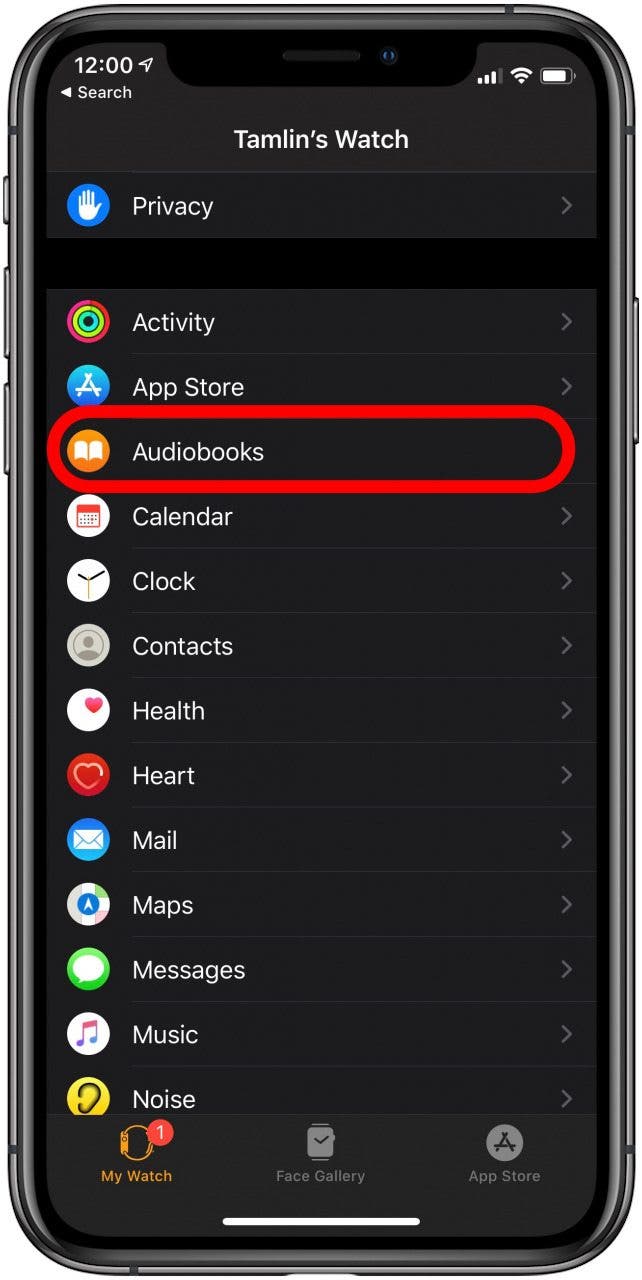
  2. On your iPhone, open the Watch app.
  3. Select Audiobooks.
  4. Tap Add Audiobook.

    How to play audiobooks on an Apple Watch How to play audiobooks on an Apple Watch
     
  5. Select the book you want to add.
  6. Your watch will download the next five hours of the book.

    How to listen to audiobooks on an Apple Watch How to play audiobooks on an Apple Watch
     
  7. On your Apple Watch, open the Audiobooks app.
  8. Scroll down and select the book you want to listen to.

     
  9. How to play audiobooks on an Apple Watch How to play audiobooks on an Apple Watch

That's it! Now you can listen to your book wherever you are, as long as you have your Apple Watch and your Bluetooth audio device. For more helpful hints to get the most out of your Apple Watch, sign up for our free Tip of the Day newsletter.

Master your iPhone in one minute a day: Sign up here to get our FREE Tip of the Day delivered right to your inbox.


* This article was originally published here

Thursday, June 4, 2020

Unlocking Your iPhone While Wearing a Mask Gets Easier Thanks to New iOS Update

Unlocking Your iPhone While Wearing a Mask Gets Easier Thanks to New iOS Update

If you haven't downloaded iOS 13.5, there's a feature that will make unlocking your iPhone while wearing a mask a little faster. Apple has rolled out a small but helpful improvement for the age of Covid-19, and if your iPhone has Face ID, it will save you time. Now, if your iPhone detects that you're wearing a face mask when you attempt to unlock your iPhone, it will immediately give you the option to go to the Passcode screen rather than rquiring you to wait while it tries to identify your face. We've already gone over how to add another person to your iPhone's Face ID and how to turn on iPhone Face ID for apps. Now, let's learn about the new Face ID update that makes it easier to unlock your iPhone while wearing a mask.

Related: Coronavirus Prevention: How to Clean & Sanitize Your iPhone, iPad, Apple Watch, AirPods & Apple TV Remote

To use this tip, you'll need to update your iPhone's software. If you've forgotten how, we have a tip on how to update iPhone software. Once your update is complete, the first time you unlock your iPhone you will be required to enter your passcode to enable Face ID. Going forward, to unlock your iPhone while wearing a mask: 

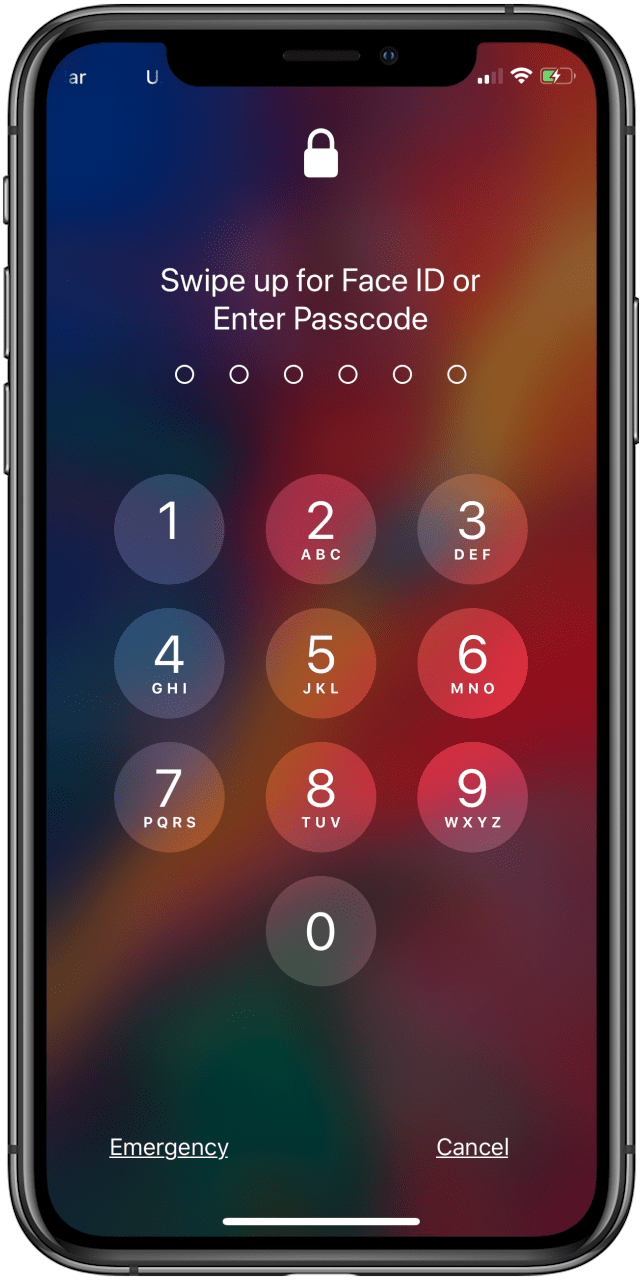
  1. Swipe up from the bottom of your iPhone's Lock screen.
  2. Your phone will give you the option to Swipe up for Face ID or Enter Passcode.
  3. Enter your passcode now.

    iphone lock screen iphone passcode screen

For more tutorials on how to use your Apple devices, subscribe to our free Tip of the Day. 

Top image credit: Twinsterphoto / Shutterstock.com

Topics: 
Master your iPhone in one minute a day: Sign up here to get our FREE Tip of the Day delivered right to your inbox.


* This article was originally published here

Wednesday, June 3, 2020

iOS 14: All the Rumors about Apple’s Latest Operating System

iOS 14: All the Rumors about Apple’s Latest Operating System

Apple announced the first version of iOS, Apple's operating system for the iPhone, iPod Touch (and formerly the iPad), back in January 2007, and at iPhone Life magazine we've been covering everything iOS related for almost as long. Starting with iOS 5, Apple has announced a new version of iOS each year at the World Wide Developers Conference (WWDC) and this year's virtual developers conference should be no exception when it comes to Apple's software announcements and our coverage of it. Don't want to wait until the big Apple keynote to find out what to expect from iOS 14? In this rumor roundup, we've got everything you should know about this year's new iOS, including expected release dates, compatibility, the possibility of 5G for the new iPhones, new apps, and improvements to classic, native apps. So read on.

Related: WWDC 2020 Apple Keynote: When & How to Watch the Next Apple Event

When Is the Next iOS Update Coming?

The first global, all-online WWDC is happening on June 22. The start time for the event hasn't been announced yet, but we'll post an update here once it is. The beta version of the iPhone operating system is usually available to developers after the conference, followed by a beta release to the public, and, finally, the official public release of the new iOS in the fall, when the new iPhones are announced. 

There's no way to know for sure which improvements and features Apple may include in the newest operating system, but here are some rumors and best guesses we've collected.

iOS 14 Compatibility

We're expecting that iOS 14 will be compatible with the same devices that can run iOS 13.

  • iPhone 11, iPhone 11 Pro, and iPhone 11 Pro Max
  • iPhone XS and iPhone XS Max
  • iPhone XR
  • iPhone X
  • iPhone 8 and iPhone 8 Plus
  • iPhone 7 and iPhone 7 Plus
  • iPhone 6s and iPhone 6s Plus
  • iPhone SE
  • iPod Touch (7th generation)

Performance Improvements

Besides offering cool new features, each new iOS brings security updates, and performance improvements that, hopefully, eliminate bugs present in previous operating systems. Sometimes, though, a new iOS can create issues. For example, many iPhone owners were dismayed to notice rapid battery drain after installing iOS 13, though this failing did improve with iOS 13.1 and beyond.  

So, what changes are we hoping and expecting to see this time around?

5G Support

Apple customers have been waiting for 5G capability to come to the iPhone; it's the most-anticipated feature of the 2020 line! What is 5G? 5G is the fifth-generation mobile network, and is slated to be the most reliable and high-capacity network to date, providing the best peak data speeds yet, and the ability to seamlessly connect multiple devices. One of the key features of 5G is its ultra-low latency, which will allow nearly real-time communication between not only mobile devices, but also other smart devices like factory tools, self-driving cars, and surgical robots.

Will this be the year that 5G support is included in the new operating system? The upcoming iPhone 12 line may be the first to have 5G capabilities, and it will require a combination of hardware and software support (which means users with older iPhones will not get to enjoy the benefits of 5G). The iOS 14 reveal will let us know if the software component to that equation is in place. 

Widgets on the Home Screen, Plus Easier App Management

Most people have dozens, if not hundreds, of apps on their iPhones, and it can take a while to find a particular app just from its icon. 9to5Mac found a bit of leaked code that indicates this problem may resolve with iOS 14. Apparently, Apple has been toying with the idea of offering a list of installed apps with different sorting options on the iPhone's Home screen, or a new screen, similar to that on the Apple Watch. To make this feature even more convenient, Siri will offer smart suggestions for apps based on location and time of day.

9to5Mac reports that dynamic widgets are finally coming to the Home screen. iPhone users will be able to move the widgets around the screen, just like apps. This feature might not be quite ready this software upgrade, so expect it for iOS 15 if it's not introduced this year.  

New iPhone Wallpaper Options

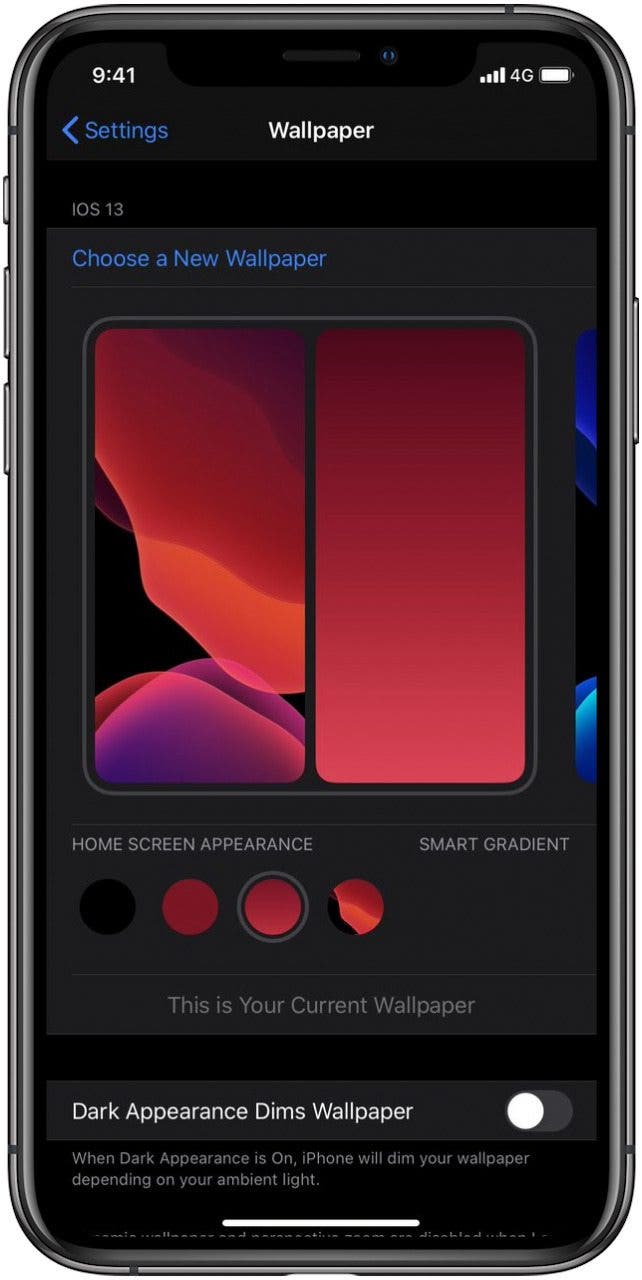
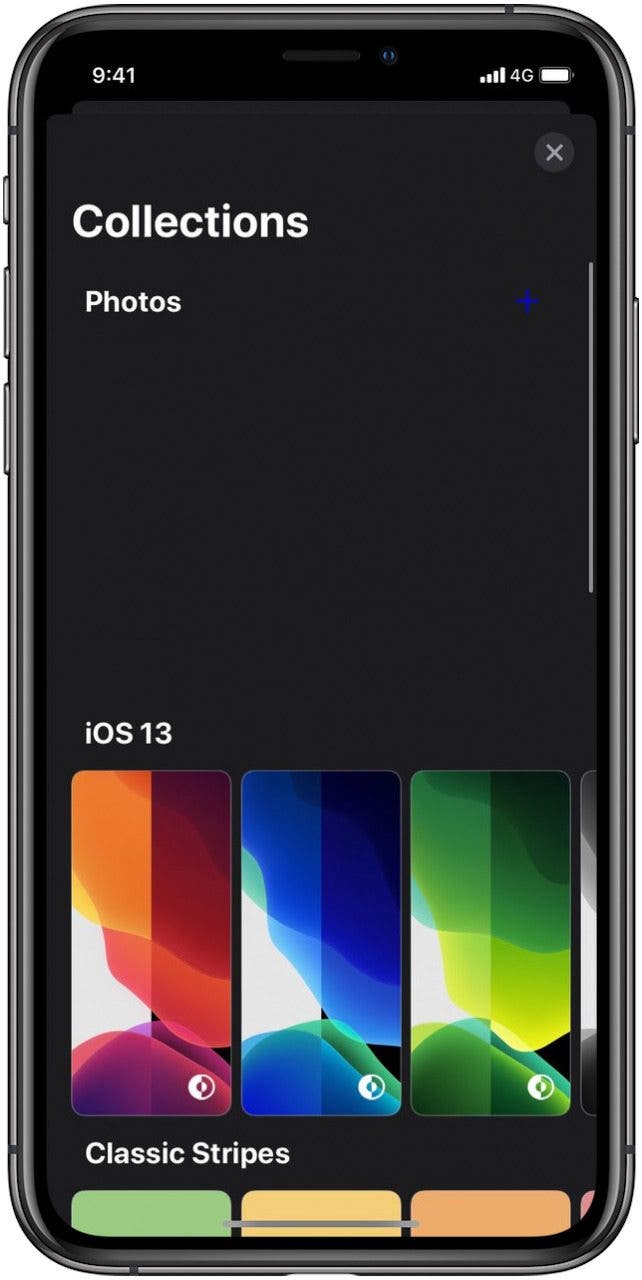
9to5Mac has found code indicating iOS14 will organize wallpaper into defined categories, so they're easier to browse through.

Twitter user DongleBookPro reports that iPhone users will be able to add their own photos to wallpaper collections, and choose between a flat, blurry, dark, or color gradient version of each wallpaper for their Home screen. 

new wallpapers

ios 14 wallpaper ios 14 wallpaper 2

Image credit: DongleBookPro

Third-party wallpapers may also become available, right through the Settings app. Lastly, wallpapers are coming to CarPlay at last, and will automatically switch between Light and Dark modes, just as with the iPhone and iPad.

Expect Upgrades to Maps, Messages, HomeKit & More

Apple Maps

The native Maps app is going to give us more information about Apple Stores and Apple Authorized Service Providers (AASP) once iOS 14 rolls out. Details will include the availability of Genius Bar services, including hardware repair, and whether or not stores offer trade-in credit. Our in-office wish list includes the hope that Maps will provide more details in the "Near Me" search results, but that isn't looking likely at this time.  

Sample Apps Before You Buy

A rumored feature called Clips will enable users to scan a QR code and sample content from third-party apps prior to installation. This way, rather than relying on App Store descriptions or reviews,  prospective buyers can test portions of apps and decide to purchase, or not, based on their own experience.

HomeKit Security & Lighting Improvements

Currently, HomeKit lighting can change color temperature using manual or scheduled controls. 9to5Mac reports that, with iOS 14, HomeKit lighting will gradually and automatically shift from cooler daytime colors to warmer light in the evening hours. 

HomeKit security cameras gain new capabilities with the new operating system, as well. The software upgrade will enable smart cameras to detect people and use facial recognition to identify them. This will allow individual-based Notifications as family members enter and leave the home. 

Messages App: Mark Messages as Unread, More

MacRumors reports that Apple is planning several convenient, new Messages features. The first of these is the ability to tag group chat members with an @ symbol. This would solve the perennial issue of overwhelming group message notifications, as users should be able to hide alerts except when they're tagged.

Another potential change we'll all appreciate: retractable iMessages. We've all texted something we wish we could take back, and now, MacRumors reports that we may be able to. The downside is that both parties will see when an iMessage has been erased, and the option may only be available for a short time after each message is sent. 

Also on the horizon, typing indicators for group Messages, and the option to mark the last message in a text thread as Unread, even after you've opened it. We've always been able to do this in the Mail app, and it's a great way to mark a message unread, so you remember to go back to it. 

A few more Messages updates from our wish list: better-organized emojis and cross-platform emoji support for Android and iPhone. Currently, iPhone owners can send emojis to each other that may not translate to Android phones, instead showing up as a question mark in a box. Can iOS 14 fix this issue?

Caption Images in the Photos App

Here's one from our wish list. The Photos app is already helpful for organizing pictures, what with the ability to make photo albums, slideshows, and more. What would be really helpful, though, is the ability to name and caption individual photos, so that all the details surrounding each picture can be recorded. 

Rumored New iPhone Apps

Fitness Tracking App

Apple has a native app for just about every need, and it looks like the tech giant is about to check one more box. MacRumors revealed that a workout app, which will be called Fit or Fitness, is included in iOS 14. The new app is expected to work with the iPhone, iPad, Apple Watch, and Apple TV. Fitness is rumored to offer workout videos that include stretches, running, strength training, cycling, yoga, and more. The Apple Watch will track workouts, as usual, and the data will be shown on paired Apple devices and logged in the Activity app as before. 

Augmented Reality (AR) App

2017 marked the introduction of Apple's augmented reality developer's platform, ARKit. AR efforts aren't limited to outside developers, though. 9to5Mac has a source that claims Apple is unveiling a new augmented reality app with iOS 14. The app is designed to give iPhone users more information about their environment via tags similar to QR codes. Customers at places like Starbucks and the Apple Store will be able to use the app to learn more about products, features, and prices. 

What's on Your iOS 14 Wish List?

What improvements are you hoping to see from Apple's new operating system? Have you heard or read about any rumors I missed? Let me know in the comments.

For more ideas and information about using your Apple devices, check out our free Tip of the Day. 

Master your iPhone in one minute a day: Sign up here to get our FREE Tip of the Day delivered right to your inbox.


* This article was originally published here

Tuesday, June 2, 2020

How to Remove Memoji Stickers from the Emoji Keyboard

How to Remove Memoji Stickers from the Emoji Keyboard

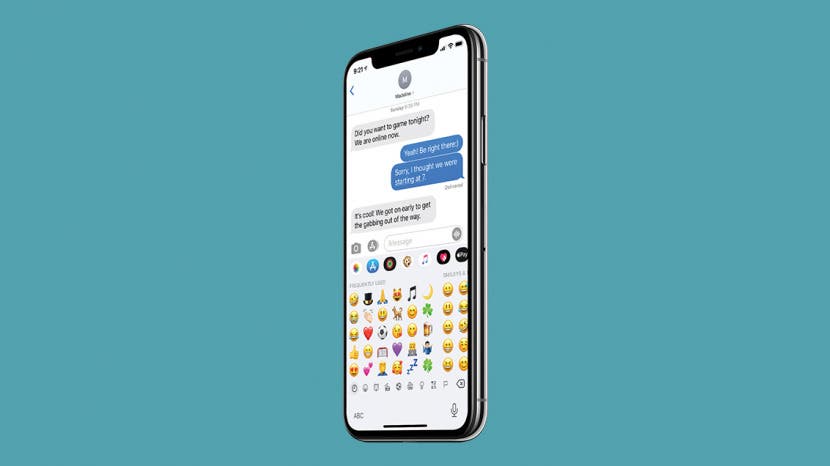
People are asking, “How do I remove Memoji keyboard stickers from my emoji keyboard?” You might have been annoyed to find that your Frequently Used emojis are preceded by a bunch of Memoji stickers that you never actually use. Luckily, there’s a hidden setting you can adjust to remove Memoji stickers from the emoji keyboard. Let’s dive in with how to get rid of Memoji stickers on the emoji keyboard so that you can once more find your favorite face-palm emoji.


Related: How to Make Your Own Memoji on the iPhone

How to Remove Memoji Stickers from the Emoji Keyboard

  1. Open Settings.
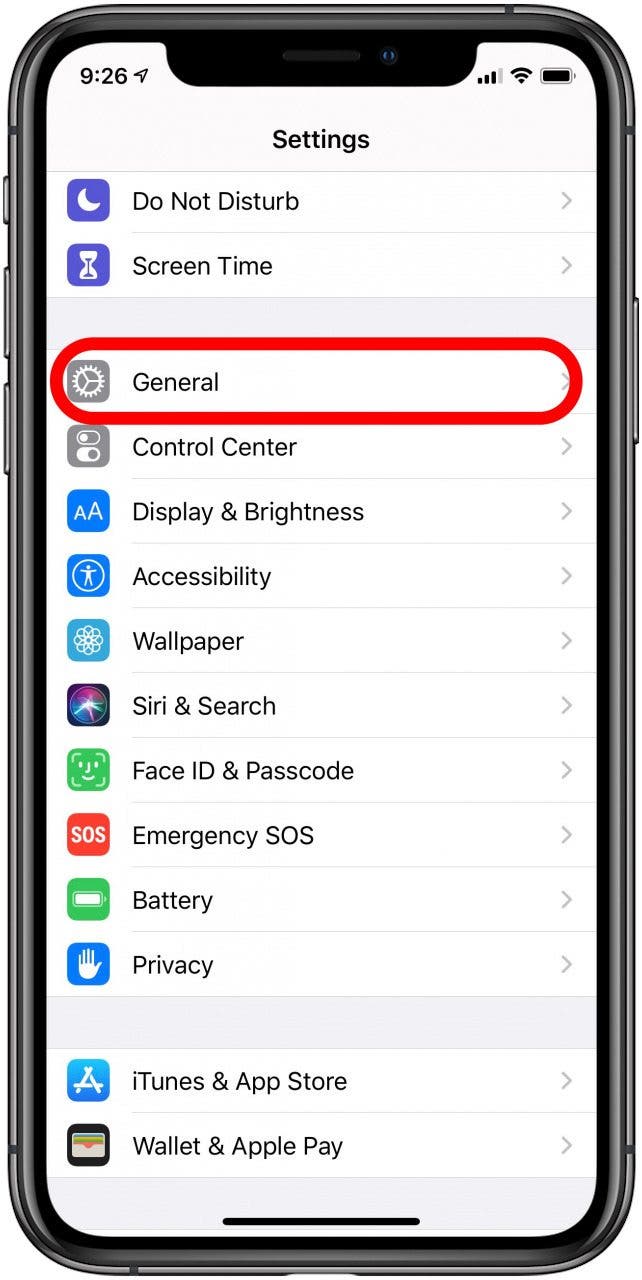
  2. Select General.
  3. Scroll down and tap Keyboard.

    How to Remove Memoji Keyboard Stickers How to Remove Memoji Keyboard Stickers
     
  4. Scroll down and toggle off Memoji Stickers.

    How to Remove Memoji Keyboard Stickers

And that’s it! Now, when you open your emoji keyboard, you'll see your favorite emojis instead of unused Memoji stickers. For more great messaging tips, like how to react to texts with Memoji stickers, sign up for our free Tip of the Day newsletter.

Master your iPhone in one minute a day: Sign up here to get our FREE Tip of the Day delivered right to your inbox.


* This article was originally published here